Ultimate Guide to AI Translation Workflow Optimization
AI translation has transformed how businesses manage localization - saving time, cutting costs, and improving efficiency.
Here’s what you need to know:
- AI translation is fast and cost-effective: Translating 10,000 words now costs under $10, compared to $0.12 per word for manual translation.
- Global reach is essential: With only 20% of the world speaking English, ignoring localization means missing 80% of potential customers.
- AI delivers better context handling: Modern tools manage tone, context, and nuances far better than older systems.
- Proven results: Companies like Polhus and Ajax Systems have saved tens of thousands of dollars and sped up delivery by up to 50%.
This guide explains how to streamline your translation workflow, choose the right tools, and combine AI efficiency with human quality checks. Whether you’re managing small projects or scaling globally, these strategies will help you save time and resources while improving results.
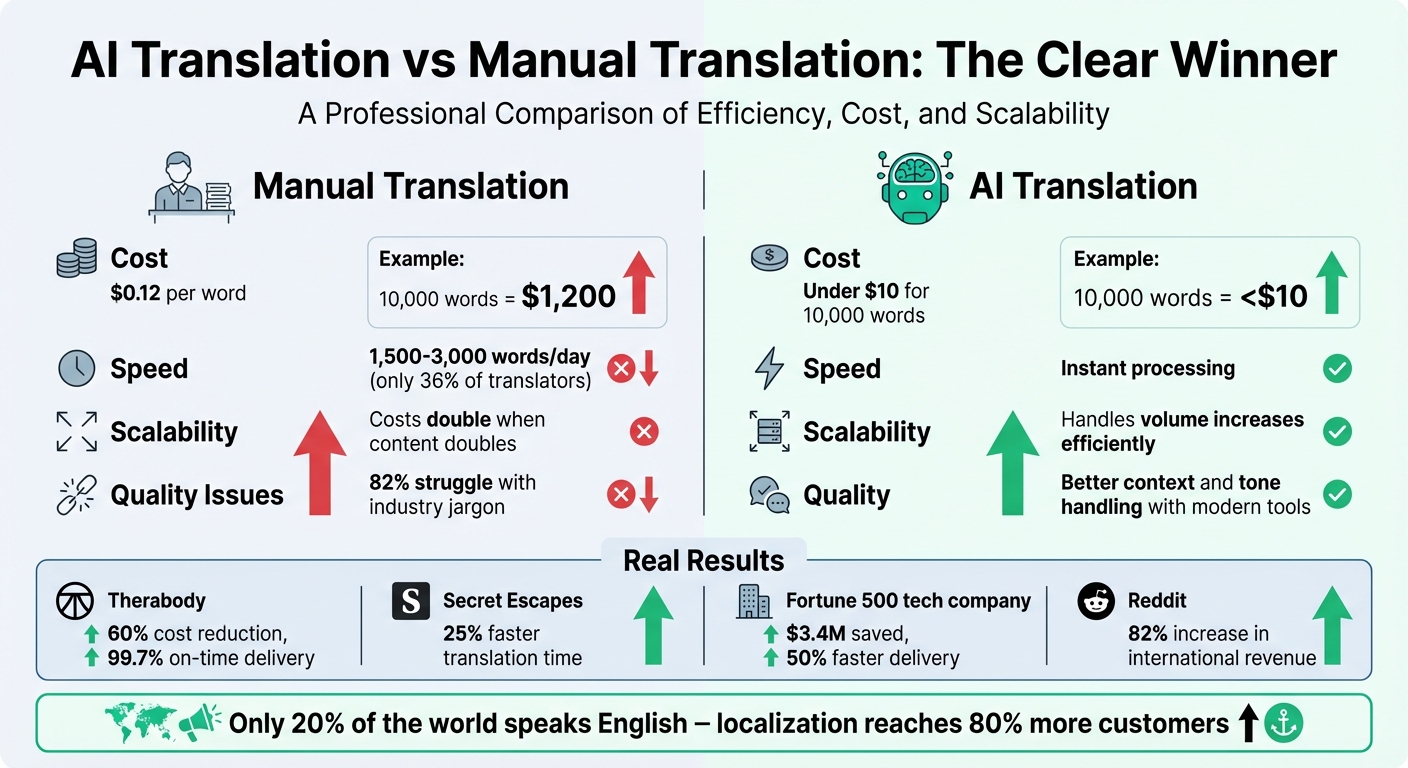
AI Translation vs Manual Translation: Cost and Efficiency Comparison
This AI translation workflow replaced $300k in translation fees
Evaluating Your Current Translation Workflow
Take a closer look at your translation process to identify bottlenecks like fragmented handoffs and repetitive tasks that waste both time and money.
Consider this: only 36% of translators can manage between 1,500 and 3,000 words per day when working manually. At the same time, project managers often get bogged down with endless email chains, juggling spreadsheets, and meeting deadlines across disconnected platforms. This kind of inefficient "email tennis" not only slows progress but also creates version control headaches, making it tough to scale operations. When content volume doubles, overhead and staffing costs often rise at the same pace.
Problems with Manual Translation Processes
Manual workflows tend to hit roadblocks when content is exported from your CMS, emailed to a translation agency, and then manually reinserted. Each step introduces delays and increases the chance of errors, leading to version control issues and scalability problems. Without a centralized Translation Memory, teams may find themselves translating the same phrases repeatedly, driving up costs unnecessarily.
The cost implications are striking: human translation typically costs around $0.12 per word, while AI-assisted tools can significantly cut expenses. That said, quality can be a sticking point - 82% of respondents noted that standard machine translation often struggles with industry-specific jargon. This shortfall frequently causes quality issues to pile up toward the end of a project, requiring time-intensive manual reviews.
Some companies have already seen the benefits of moving past manual processes. In October 2025, Therabody adopted AI-powered translation workflows, slashing translation costs by 60% and achieving a 99.7% on-time delivery rate. Similarly, Secret Escapes, a luxury travel brand, automated routine translation tasks for hotel deals. This change reduced their translation time by 25% across all languages, allowing editorial teams to focus on creative work rather than administrative tasks.
Mapping out your current process is the first step to identifying inefficiencies like these.
Documenting Your Current Workflow
Start by tracking a single piece of content from creation to publication. Document every step in detail - where it’s stored in your CMS, how it’s extracted, translated, reviewed, and reinserted. This content lifecycle audit can highlight manual touchpoints that are ripe for improvement with AI.
Bring together a task force that includes your Localization Manager, a technical lead, a content owner, and someone from finance. Work as a group to visually map your workflow, noting every email exchange, spreadsheet, and manual upload. Pay attention to warning signs like disconnected translation memories, frequent file transfers between platforms, and processes that rely heavily on email.
Then, ask yourself a key question: Could your current system handle a 10× increase in content volume? If manual file management or coordination would create bottlenecks, it’s a clear signal that AI could deliver major benefits. Automated systems can reduce costs by 40–60% and speed up delivery times by 50–70%.
Use the insights from this workflow audit to guide the integration of AI translation tools into your process. By addressing inefficiencies now, you can set the stage for smoother, faster, and more scalable translation workflows.
Choosing the Right AI Translation Tools
After identifying inefficiencies in your workflow, the next step is finding AI translation tools that address those gaps without creating new ones. The ideal tool should integrate smoothly with your existing systems, maintain your brand voice, and grow with your business.
Features to Look for in AI Translation Tools
Integration is a must. Choose tools that connect directly to your CMS - whether it’s WordPress, Contentful, or a custom platform - and to e-commerce systems like Shopify or WooCommerce. A simple JavaScript tag or API connection should make integration hassle-free.
Quality control features are another key consideration. Look for platforms with automated QA, confidence scoring, and support for MQM (Multidimensional Quality Metrics) to ensure translations are accurate, fluent, and on-brand. For example, in July 2025, a Fortune 500 tech company saved $3.4 million and cut translation times by 50% while maintaining a 99+ MQM score.
Maintaining brand consistency is equally important. Tools with terminology management, style guide integration, and Translation Memory can ensure your messaging stays consistent. In 2025, Secret Escapes leveraged AI trained in their brand voice to manage 20% more marketing campaigns without increasing freelance costs.
Contextual editing is another must-have. In-context editors let you preview translations directly within your website layout. This is crucial since 67% of B2B buyers prefer websites that feel localized.
Security and compliance features are non-negotiable. Ensure the tool offers GDPR compliance, encrypted connections, and private inference options. If operating in France, confirm it supports the Toubon Law for legal and commercial content.
Finally, continuous localization is a game-changer. The right tool should detect updates in your source content and instantly apply them across all language versions, eliminating the need for batch processing.
"AI isn't replacing human translators; it's supercharging the role. Today's translators are becoming post-editors and prompt engineers." - Brandon Paton, CEO, Localize
These features form the foundation of a reliable solution - and that’s where Heylingo comes in.
How Heylingo Simplifies Website Localization
Heylingo delivers on these requirements with its no-code website translation approach. It translates your site into 30+ languages automatically, without needing technical setup, redesigns, or developer input. Its lightweight script integrates seamlessly with any website, CMS, or online store, and it even offers a dedicated Shopify plugin for e-commerce platforms.
The platform continuously pulls updated content into a user-friendly dashboard, allowing you to review, edit, and fine-tune translations in real time. With its on-page editor, you can preview changes directly within your website layout before publishing, ensuring translations align perfectly with your design.
Heylingo is GDPR compliant and powered by a fast global CDN, ensuring quick page loads for international users. Its Translation Memory feature helps maintain consistency while cutting costs by reusing past translations. Pricing starts at $10/month for the Starter plan (covering 100,000 characters, about 20,000 words) and scales to $69/month for the Scale plan (1,000,000 characters, approximately 200,000 words). All plans include unlimited team members and support for over 30 languages.
For businesses looking to expand into new markets, Heylingo offers a streamlined way to turn international visitors into paying customers. Its continuous localization ensures that updates to your source content are automatically reflected across all language versions, keeping your site fresh and relevant in every market.
Preparing Source Content for AI Translation
The quality of your source content plays a huge role in the success of AI translation. If your text is cluttered, inconsistent, or unclear, AI will not only replicate those issues but could also make them worse across all target languages. A well-organized and polished source significantly boosts translation accuracy and cuts down on post-editing time.
Think of AI as a literal interpreter. Unlike human translators who can pick up on context and infer meaning, AI relies on clear, precise input. Typos, vague wording, or inconsistent terminology can lead to widespread errors. That’s why preparing your source content carefully is so important if you want to get the most out of AI translation.
Cleaning and Structuring Source Text
Start by simplifying your sentences. Stick to short, straightforward sentences and avoid complex structures. For instance, instead of saying, "The report was reviewed by the team", go with "The team reviewed the report." This makes it easier for AI to process and translate accurately.
Avoid slang, idioms, or words with multiple meanings that might confuse the AI. Take the word "table", for example - it could mean a piece of furniture or a data chart. Without clear context, the AI might pick the wrong meaning. Similarly, stick to one term for each concept. Mixing terms like "client" and "customer" can lead to inconsistencies in the translation.
Before running your text through AI, correct all errors and remove redundancies. Even small mistakes, like typing "assked" instead of "asked", can result in translations that don’t make sense. Pay attention to technical details, too. Use standard HTML tags, as non-standard ones might confuse the AI. Write numbers as digits rather than words, minimize unnecessary capitalization, and avoid using CAPS LOCK excessively - capitalized words might remain untranslated. Lastly, create a "Do Not Translate" list for elements like brand names, product names, file paths, and URLs to ensure they stay intact.
| Optimization Task | If Skipped | Result |
|---|---|---|
| Orthography Check | Typos (e.g., "assked") | Nonsensical or incorrect translations |
| Format Unification | Inconsistent dates/currencies | Errors in localized formats (e.g., 02/03/2026 vs 03/02/2026) |
| Tone Definition | No clear formality rules | Inconsistent tone (formal vs. informal) |
| Tag Standardization | Non-standard HTML tags | AI may misinterpret tags, breaking sentence structure |
| Case Sensitivity | Excessive use of CAPS LOCK | Capitalized words might remain untranslated |
Once your text is clean and structured, it’s time to set up clear terminology and style guidelines to direct the AI.
Creating Terminology and Style Guides
Consistent input naturally leads to better AI output, which is why developing a solid terminology and style guide is crucial. AI works best when given clear, rule-based instructions. Keep your style guide concise - 2,000 words or less is ideal - to avoid overwhelming the system. Use clear headings like "Abbreviations & Acronyms", "Numbers & Currency", and "Tone of Voice" to make the guide easy to follow.
Be direct with your instructions. Instead of saying, "Consider using informal language", write, "Use the informal 'Tu' for all Spanish verbs." Providing clear "Do" and "Don't" examples can further reinforce consistency. Separate non-translatable terms, product names, and trademark rules into a dedicated glossary rather than embedding them in the style guide.
"Having a structured glossary and style guide makes a huge difference because the AI is only as good as you train it."
- Joaquín Muñoz, Localization Manager, Life360
Many modern AI platforms use vector cloud technology to integrate style guides and past marketing copy. This helps them better mimic your brand’s voice. For example, the Estonian government successfully applied this method when using Large Language Models to translate complex legal texts for their e-Land Register and e-Business Register, making these resources accessible to international users.
Before rolling out your style guide, test it by running sample translations. Both the glossary and the style guide act as structured datasets that fine-tune AI output, reducing post-editing needs and ensuring translations stay consistent with your brand.
sbb-itb-8482ffa
Building an AI-Driven Translation Workflow
Once you have clean content and clear guidelines, it’s time to build your workflow. This means connecting your AI translation tools to your content sources and creating a system that blends automation with human oversight. The aim? A pipeline that can handle large volumes efficiently while ensuring quality where it matters most.
When designed thoughtfully, an AI-powered workflow doesn’t just make things faster - it reshapes how localization operates. Instead of treating translation as an isolated, manual task, it becomes a seamless part of your content lifecycle. Done well, this approach can boost throughput by 40–70% for bulk content while cutting costs and keeping consistency across multiple languages.
Integrating AI Translation Tools into Your Process
The first step is to ditch scattered spreadsheets and endless email threads. Instead, centralize everything in a Translation Management System (TMS). This system acts as the hub for your linguistic assets - Translation Memories, glossaries, and style guides. From there, link your TMS directly to your content sources using APIs, webhooks, or pre-built connectors. Whether you’re running a WordPress blog, a Shopify store, or managing a GitHub repository, modern platforms can automatically pull content, translate it, and push it back - no need for manual file uploads. For website localization, tools like Heylingo make the process even easier by translating your site into 30+ languages using a simple script - no coding or technical setup required.
To streamline even further, use automated triage systems that rely on metrics like confidence scores or Translation Memory match percentages. For instance, segments with a 95%+ TM match might bypass review, while marketing content is flagged for human editing. A study found that automating 70% of the localization process and cutting manual effort by 30% saved one company approximately $1.4 million annually in licensing, time, and operational costs.
Another key step is enriching the AI’s context. Don’t just feed it raw text - upload brand guidelines, past marketing materials, or even UI screenshots to help the engine understand tone and intent. In one pilot study, providing this kind of context led to 71% of translations being approved by proofreaders without any changes. The more context you provide, the less work you’ll need to do later.
Once automation is in place, the focus shifts to refining quality through targeted human oversight.
Adding Human Review and Post-Editing
While automation handles speed and scale, human expertise ensures translation quality. AI is great for efficiency, but humans bring the nuance, judgment, and brand alignment needed for excellence. The trick is knowing where to apply each. Not all content requires the same level of review - internal FAQs might only need light editing, while legal documents or marketing copy demand a much deeper review.
A tiered quality system works well here:
- Raw MT (machine translation): Suitable for internal documentation where perfect polish isn’t necessary.
- Light MTPE (machine translation post-editing): Focuses on correcting errors and ensuring clarity, ideal for knowledge base articles or product descriptions.
- Full MTPE: Involves stylistic adjustments and brand voice alignment, reserved for customer-facing content like landing pages or ad campaigns.
One company that adopted this tiered approach reduced translation costs by 60% while achieving a 99.7% on-time delivery rate.
To continuously improve your AI output, integrate every human edit back into your Translation Memory. Track key metrics like Time to Edit (TTE) - the time it takes a translator to fix a segment. A high TTE might mean your AI engine needs retraining or that certain content types aren’t ideal for automation.
Start small by piloting your AI workflow with low-risk content like support articles or internal documents before tackling brand-sensitive material. Set clear quality tiers, establish automated review gates based on confidence scores, and keep measuring results. By combining AI’s speed with human judgment, you can turn localization from a bottleneck into a powerful advantage.
Tracking Performance and Improving Results
Once you’ve combined AI tools with human expertise, the next step is to monitor performance. Building an AI-driven workflow is just the start - tracking the right metrics is how you unlock its potential. Without this, you won’t know if your AI is actually saving time, cutting costs, or improving translation quality. The key is to focus on metrics that tie directly to your business goals, not just technical benchmarks. Here’s a breakdown of the most important metrics to keep an eye on.
Key Metrics for Workflow Optimization
One of the most important metrics to track is Time to Edit (TTE), which measures how long it takes a linguist to bring AI-generated output up to human quality standards.
"TTE measures the real-world editing effort required for professional linguists to bring AI-generated translation to the desired quality level."
In addition to TTE, Errors Per Thousand (EPT) is another critical metric. It counts the number of errors per 1,000 translated words during quality assurance reviews, giving you a clear picture of accuracy. Metrics like Words Per Hour (WPH) help track productivity, while On-Time Delivery (OTD) ensures deadlines are being met. You can also monitor Content Changes/Velocity to identify unnecessary review steps. For example, if revisions make up less than 5% of the content, you might be able to streamline the process.
Modern scoring systems like COMET and BLEURT are now preferred over older metrics like BLEU because they align more closely with human quality assessments. Some platforms even offer a Quality Confidence Score, which uses machine learning to predict translation quality before it’s reviewed. For instance, the LILT platform has shown it can improve linguist efficiency by 20%.
Beyond these technical measures, it’s important to track business-focused metrics like conversion rates on translated pages, site traffic, and revenue generated from localized content. These metrics show whether your improved workflows are delivering real benefits, like cost savings, faster turnaround times, and a better return on investment (ROI).
Using Analytics to Refine Your Workflow
Once you’ve set up metrics, the data can guide you in spotting inefficiencies and making improvements. For example, velocity analytics can reveal which stages in your workflow are slowing things down, helping you streamline operations.
A/B testing is another useful tool. By testing identical content across different AI engines, you can measure TTE and determine which engine offers the best ROI. Over time, refining your AI models can lead to noticeable accuracy gains.
The MQM framework is a great way to classify errors into categories like accuracy, fluency, and style. This can help pinpoint problem areas and guide targeted fixes. Feeding human edits back into your Translation Memory can also help fine-tune the AI, gradually reducing TTE.
Tracking edit distance metrics, like Word Error Rate (WER), can highlight inefficiencies in your team. For example, some linguists may be over-editing (slowing things down), while others might be under-editing (risking quality issues). Some companies even adjust translation rates based on AI accuracy. For instance, if accuracy falls between 80% and 89%, they might offer a 40% discount on rates while expecting reviewers to process about 900 words per hour.
Advanced analytics can improve system reliability too. For example, increasing connector stability from 95% to 99.99% can significantly enhance performance. These improvements can also lead to cost reductions of 40% to 65%.
Finally, consider setting up two dashboards: one for internal use (to track project timelines and delays) and another to showcase ROI and business impact to external stakeholders. This dual approach ensures you’re managing operations effectively while also demonstrating value to key decision-makers.
Conclusion
AI-powered translation workflows have shifted from being just an operational expense to becoming a driving force for business growth. Fine-tuning your localization process is critical if you want to connect with the 80% of potential customers you haven’t reached yet. With 96% of B2B leaders reporting positive ROI and some seeing returns as high as threefold, localization has become a cornerstone of global engagement.
The winning formula blends the efficiency of AI with the precision of human oversight. This combination delivers exceptional results. For instance, Reddit saw a fourfold increase in daily active users and an 82% jump in international revenue after adopting AI translation tools. Likewise, Asana automated 70% of its localization workflows, saving $1.4 million annually.
For companies looking to expand globally, Heylingo simplifies the process by removing technical hurdles. With Heylingo, you can translate your website into over 30 languages in just five minutes. Its simple script and seamless CMS integration ensure compatibility with any website or online store, including a Shopify plugin. Plus, the user-friendly dashboard lets you review and tweak translations with ease. When paired with the workflow optimization strategies mentioned earlier, Heylingo becomes a powerful tool for global outreach.
By 2030, 95% of executives anticipate AI translation tools will be indispensable for international operations. Start small - localize low-risk content, build glossaries and style guides, and then scale up. Monitoring metrics like Time to Edit and conversion rates on translated pages will provide clear insights into your localization efforts' real impact.
Breaking language barriers today goes beyond simple translation. It's about creating immersive, localized experiences that turn international visitors into loyal customers.
FAQs
How do AI translation tools make localization faster and more efficient?
AI translation tools make localization faster and easier by automating critical parts of the process. These tools leverage advanced language models to provide precise translations that reflect specific cultural nuances, helping businesses reach global audiences with less effort.
By taking over tasks like content extraction and initial translation, they cut down on manual work, freeing up teams to concentrate on polishing and reviewing. Plus, they support workflows that can scale, which is especially helpful for managing frequent updates and keeping up with global market needs. When AI-driven automation is combined with human review, translations stay accurate, culturally appropriate, and consistent - key factors for successful international expansion.
What key features should I consider when choosing AI translation software?
When choosing AI translation software, it's important to focus on features that deliver accuracy, efficiency, and simplicity. One key feature to look for is context-aware translation, which helps create translations that feel natural and fit the intended tone. Another essential tool is terminology management, which ensures your brand messaging stays consistent across different languages.
You should also consider whether the software can integrate with your current workflows or CMS, supports a wide range of languages, and allows for manual editing or review when needed. For businesses, features like GDPR compliance, SEO-friendly translations, and team collaboration tools can make localization smoother and help you reach international audiences more effectively. By focusing on these aspects, you can produce high-quality, localized translations with less hassle.
How can I ensure AI translations reflect my brand’s tone and style?
To make sure AI translations mirror your brand’s tone and style, start by crafting a style guide. This guide should detail your preferred tone, specific terminology, and phrasing. Think of it as a roadmap for both AI tools and human editors to maintain uniformity across all your content.
It's also essential to combine AI with human oversight. Human reviewers can adjust translations for subtle nuances or markets where cultural context plays a big role. By regularly reviewing and editing AI-generated content, you can ensure it stays true to your brand’s voice and messaging.
Lastly, integrate ongoing feedback and performance tracking into your process. This helps you fine-tune translations over time, ensuring your brand voice remains consistent and resonates in every language.