10 Best Practices For Multilingual Website Speed
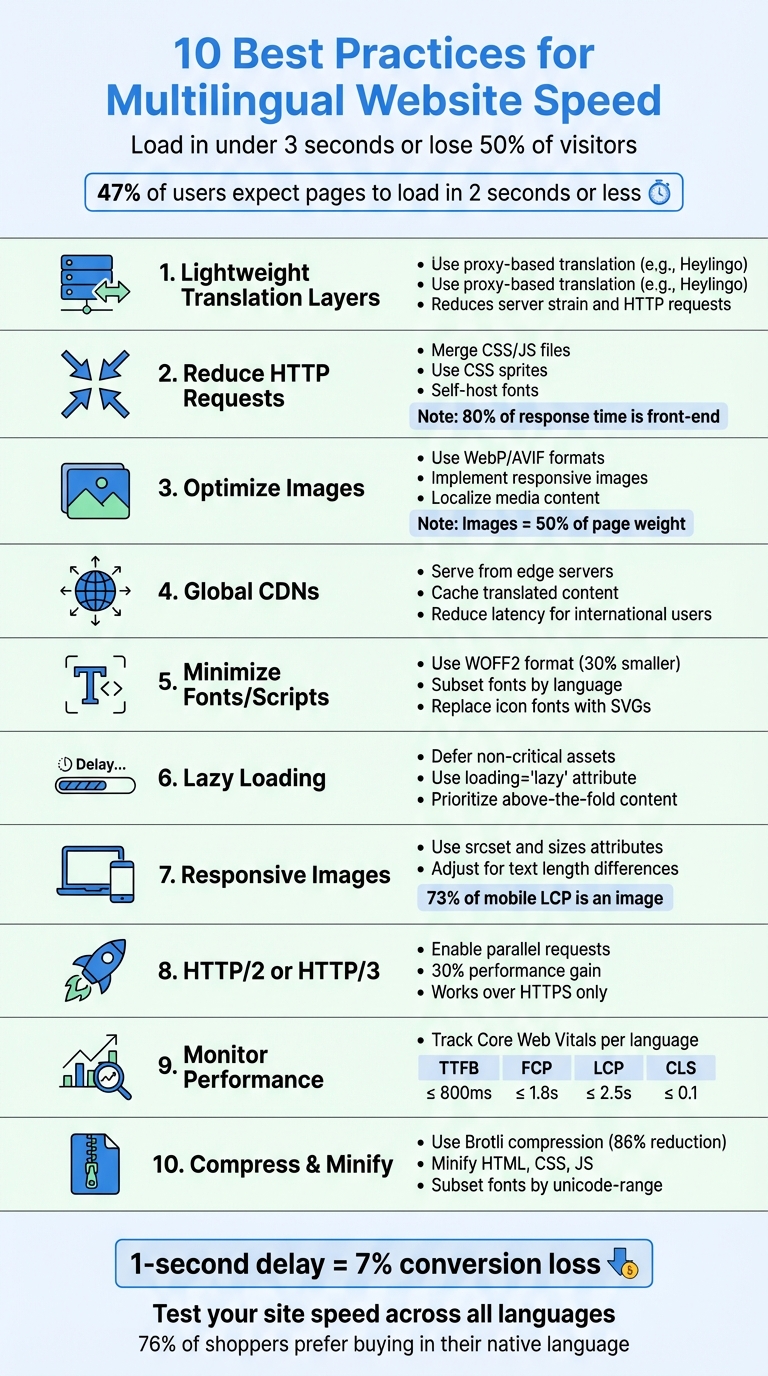
Want a fast multilingual website? Here’s a quick guide to improving load times for all language versions. Visitors expect your site to load in under 3 seconds - anything slower risks losing nearly half of them. Managing speed across languages can be tricky, but these 10 practices will help:
- Lightweight Translation Layers: Use tools like Heylingo to translate content without overloading your server.
- Reduce HTTP Requests: Merge CSS/JS files, use CSS sprites, and self-host fonts to cut unnecessary requests.
- Optimize Images: Use modern formats like WebP, responsive images, and localized media to reduce file sizes.
- Global Caching/CDNs: Serve content from edge servers to minimize latency for international users.
- Minimize Fonts/Scripts: Subset fonts by language and replace icon fonts with SVGs for faster rendering.
- Lazy Loading: Defer non-critical assets like images and videos until they’re needed.
- Responsive Images: Adjust images for different languages and devices using
srcsetandsizes. - Enable HTTP/2 or HTTP/3: Speed up parallel requests with modern protocols.
- Monitor Performance: Track Core Web Vitals (LCP, FCP, CLS) for each language version.
- Compress and Minify Code: Shrink HTML, CSS, and JS files with tools like Brotli or gzip.
Why it matters: A 1-second delay can reduce conversions by 7% and user satisfaction by 16%. These steps ensure fast, consistent experiences across all languages, improving user retention and search rankings. Let’s dive into the details.
10 Best Practices for Multilingual Website Speed Optimization
How to Build Fast Multilingual Sites with WPML
1. Use a Lightweight Translation Layer Like Heylingo
Traditional translation plugins often bog down your site with extra database queries and scripts, leading to slower page loads. A lightweight translation layer, like Heylingo, works differently. Acting as a proxy server, it translates your content without burdening your core infrastructure. This method not only reduces server strain but also helps improve your website's performance metrics .
Impact on Core Web Vitals (TTFB, FCP, LCP)
By shifting translation tasks to a dedicated proxy, Heylingo improves Time to First Byte (TTFB) . With fewer demands on your origin server, render-blocking scripts are minimized, speeding up First Contentful Paint (FCP). When combined with a global CDN, this approach also significantly reduces Largest Contentful Paint (LCP) times.
Reduction of HTTP Requests and Asset Size
Instead of embedding translations directly into media files, lightweight translation layers use overlay text or subtitle files (like .sub or .xml). This keeps asset sizes small and ensures all text remains indexable by search engines. Plus, it eliminates the need to create duplicate media versions for different languages, cutting down on unnecessary HTTP requests.
Ease of Implementation Across Multiple Locales
Heylingo simplifies the process of translating your site. It automatically detects all your content - menus, widgets, and even third-party apps - without requiring manual tagging. Using a subdirectory structure (e.g., example.com/es/), it consolidates SEO authority under a single domain while automatically handling hreflang tags, which are notoriously tricky for technical SEO . The best part? Setup takes about five minutes, and you don’t need any coding skills. It works seamlessly with CMS platforms, custom sites, and online stores.
Compatibility with Global CDNs and Caching
Heylingo integrates with a global CDN, storing translated HTML versions on servers worldwide. This means visitors see faster load times, as content is served from the nearest server rather than being routed back to your origin server in the U.S. For an extra boost, you can add a preconnect hint in your document head (e.g., <link rel="preconnect" href="[origin-url]">) to establish early connections with the translation origin.
2. Reduce HTTP Requests Across All Language Versions
When a browser loads your multilingual site, it sends out separate requests for CSS files, JavaScript, images, and fonts. Multilingual websites face an even greater challenge because they often require language-specific fonts and localized media, multiplying the number of requests. With about 80% of end-user response time spent on the front-end - mostly downloading these components - managing these requests becomes crucial. Fewer requests mean faster load times. Here’s how you can streamline file requests and improve speed.
Cutting Down HTTP Requests and Asset Sizes
Start by combining JavaScript files and merging CSS into a single stylesheet to reduce the number of requests. For images, CSS sprites can be a game changer. This method combines several background images into one file and uses background-position to display specific parts, which is especially useful for localized icons or UI elements across different language versions.
For fonts, switch to variable fonts to replace multiple font files, and use font subsetting with the unicode-range descriptor to load only the characters you need (e.g., Latin for English or Cyrillic for Russian). Inline small CSS snippets and SVG icons directly into your HTML for critical above-the-fold content, eliminating separate file requests altogether.
Since 40–60% of visitors arrive with an empty cache, it’s essential to set far-future Expires or Cache-Control headers on static assets. Use versioned filenames like script_v1.2.js to ensure updated files are refreshed, and self-host fonts on your CDN to avoid extra DNS lookups.
How This Impacts Core Web Vitals (TTFB, FCP, LCP)
Reducing HTTP requests directly enhances Core Web Vitals. Time to First Byte (TTFB) gets better because your server processes fewer connections and DNS lookups. First Contentful Paint (FCP) improves when critical CSS and font declarations are inlined in the <head>, enabling the browser to render content immediately without waiting for external files. For Largest Contentful Paint (LCP), cutting unnecessary scripts that delay main content loading is key. Since 73% of mobile pages have an image as their LCP element, optimizing image requests has a direct and noticeable impact on this metric.
3. Optimize Images and Media for Each Language
Building on strategies for streamlining requests and translations, optimizing images plays a huge role in ensuring fast load times across multiple languages. Images can make up nearly 50% of a 2MB page. Localized sites often require tailored visuals like hero banners, product images, or culturally specific graphics. Since 73% of mobile pages rely on an image as their Largest Contentful Paint (LCP) element, refining these assets is essential for both speed and user experience. This process not only reduces file sizes but also improves performance metrics significantly.
Impact on Core Web Vitals (TTFB, FCP, LCP)
Optimized images have a direct effect on Core Web Vitals. LCP, for instance, is heavily influenced by how quickly visual elements load. Using modern image formats like WebP or AVIF can reduce file sizes and improve Resource Load Duration. Focus on LCP-critical images, such as hero banners, by assigning fetchpriority="high" and setting explicit width and height attributes. Avoid lazy loading these key visuals to prevent delays.
"Optimizing image requests may be the single biggest performance optimization you can make." - web.dev
Reducing HTTP Requests and Asset Sizes
Cut down on unnecessary image requests. For small icons or decorative elements used across all language versions, consider embedding them as inline SVGs directly in your HTML to eliminate extra HTTP requests. For localized images, use an image CDN that dynamically adjusts resolution and compression based on the visitor's device and location. This strategy not only minimizes file sizes but also reduces latency, benefiting international users in particular.
Localization Across Multiple Languages
When localizing images, it's more than just translating text. For example, in 2013, Nike's EMEA SEO lead, Joshua Lohr, managed 26 ecommerce experiences in nine languages. He faced a challenge with "cross-contamination", where U.S. English pages outranked UK English pages on Google.co.uk. By applying proper hreflang markup sitewide - a project that took nine months - Nike improved organic search visibility in the EMEA region. Additionally, include translated alt text for accessibility and adapt images to align with cultural or directional norms. For Right-to-Left languages like Arabic or Hebrew, flip directional icons and adjust layouts accordingly.
Leveraging Global CDNs and Caching
Use a subfolder URL structure (e.g., example.com/es/) instead of subdomains or country-code top-level domains. This approach consolidates SEO authority at the root domain and simplifies CDN caching rules. Host media on a global CDN to minimize DNS lookups and connection delays. Enhance this setup with resource hints like rel=preconnect and rel=dns-prefetch in your <head> to establish quicker connections to CDN edge servers. Lastly, configure proper Cache-Control headers for static assets to maximize browser and CDN caching. Together, these steps ensure consistent performance for all localized media assets.
4. Use Global Caching and Content Delivery Networks
Impact on Core Web Vitals (TTFB, FCP, LCP)
Content Delivery Networks (CDNs) improve performance by serving content from edge servers, which helps reduce Time to First Byte (TTFB) and speeds up resource loading. A lower TTFB directly impacts when the Largest Contentful Paint (LCP) occurs, making pages feel faster to users.
"Any time you can serve content directly from the edge and avoid a trip to your origin server is a performance win." - web.dev
By caching HTML at the edge, even for short periods, access times for international visitors improve dramatically. Modern CDNs using protocols like HTTP/3 and QUIC also handle parallel requests efficiently, which is especially important for loading multiple localized assets. This efficiency ensures faster delivery of content in different languages.
Reduction of HTTP Requests and Asset Size
Smart caching strategies reduce the need for frequent API and database calls. For example, shared assets like logos can be reused across various language versions using custom cache keys.
"Caching translated content not only reduces calls to the Google Cloud Translation API but also decreases load and compute usage on your backend web servers and databases." - Tristan Li and Wayne Davis, Principal Architects, Google Cloud
This approach avoids unnecessary cache fragmentation and cuts down on the number of HTTP requests, leading to better overall performance.
Ease of Implementation Across Multiple Locales
A well-configured CDN setup can significantly enhance the speed of multilingual websites. Using a subfolder URL structure, such as example.com/fr/ or example.com/de/, is often the preferred approach for multilingual setups. This method consolidates SEO authority under the root domain and simplifies cache management compared to subdomains or country-specific domains. For instance, Nike successfully managed 26 ecommerce sites in 9 languages with this structure, resolving issues with regional search results.
To optimize caching further, set Time-to-Live (TTL) values based on how often content updates. Static assets like fonts and logos can have long expiration times, while dynamic content, such as news articles, should use shorter TTLs. Use versioned URLs (e.g., style.v2.css) to ensure CDNs fetch updated content immediately across all edge nodes, eliminating the need for manual cache invalidation. Additionally, enabling negative caching allows temporary storage of common errors like 404s, reducing the load on origin servers during traffic spikes.
5. Minimize Fonts and Scripts
Keeping fonts and scripts optimized is essential for maintaining fast load times, especially across multilingual sites. When browsers struggle to load web fonts or scripts quickly, it delays text rendering, which directly impacts First Contentful Paint (FCP) and Largest Contentful Paint (LCP). This issue becomes even more pronounced for multilingual websites - while Latin fonts include 100 to 1,000 glyphs, CJK (Chinese, Japanese, Korean) fonts can contain over 10,000 characters.
One effective method is using font-display: optional. This gives web fonts a strict 100ms window to load. If they fail to load within that time, the browser switches to a fallback font without swapping later, which helps avoid layout shifts and keeps Cumulative Layout Shift (CLS) at zero. Below are some practical strategies to streamline fonts and scripts for better performance.
Impact on Core Web Vitals (TTFB, FCP, LCP)
Breaking up long JavaScript tasks - those taking over 50ms - prevents blocking the main thread and improves Interaction to Next Paint (INP).
"By breaking up long tasks, you're giving the browser more opportunities to fit in critical, user-blocking work." - web.dev
Reducing HTTP Requests and Asset Size
Switch to WOFF2 format for fonts, as it offers about 30% better compression than WOFF. Additionally, use font subsetting with the unicode-range descriptor to load only the characters needed for each locale. For example, Latin subsets for English, Cyrillic for Russian, or CJK subsets for Asian languages. Tools like glyphhanger or subfont can automate this process for self-hosted fonts, while Google Fonts supports the text= parameter to request specific characters.
"Use only WOFF2 and forget about everything else. This will simplify your CSS and workflow massively and also prevents any accidental double or incorrect font downloads." - Bram Stein, 2022 Web Almanac
To further reduce HTTP requests, replace icon fonts with compressed SVGs. These offer the same functionality without the overhead of additional font downloads. For body text, consider using font-family: system-ui, which eliminates font downloads entirely while maintaining a native appearance across different locales.
Simplifying Implementation for Multiple Locales
Efficient hosting and loading practices can significantly enhance performance across different regions. Self-hosting fonts on your CDN and leveraging HTTP/2 or HTTP/3 allows multiple small font and script files to load in parallel, eliminating the need for extra DNS lookups and connection setups.
Code splitting is another effective strategy. By loading only the necessary JavaScript for each locale, you can avoid overloading the main thread. The Scheduler API (scheduler.yield()) is particularly helpful for breaking up long tasks, improving responsiveness for users in various regions.
Compatibility with Global CDNs and Caching
Smaller, minified files and subsetted fonts cache more effectively on CDN edge servers. This reduces the distance data needs to travel, speeding up load times for international users. Language-specific subsetting also prevents browsers from downloading large, multi-language font files when only a single subset is required.
For even faster loading, inline critical @font-face declarations and use preload to fetch key fonts early from the nearest CDN edge server. This approach ensures that fonts are ready to render as soon as possible, seamlessly integrating with global CDN infrastructure.
6. Apply Lazy Loading for Non-Critical Assets
Lazy loading is a smart way to delay loading off-screen elements, like images and iframes, until they're actually needed. This helps speed up the initial page load by focusing bandwidth on content that's immediately visible to the user. For multilingual websites catering to global audiences with varying network speeds, lazy loading ensures users aren’t forced to download localized banners or region-specific videos before they scroll to them. These optimizations can have a direct impact on your site's performance metrics.
Impact on Core Web Vitals (TTFB, FCP, LCP)
Deferring non-essential JavaScript and CSS can significantly improve First Contentful Paint (FCP) by reducing the amount of code the browser has to process during startup. Lazy loading also helps prioritize bandwidth for key resources, like your Largest Contentful Paint (LCP). For pages struggling with LCP, the delay in loading the LCP image often exceeds 1,290 milliseconds at the 75th percentile - this is more than half the recommended time for a smooth user experience.
"Lazy loading is a strategy to identify resources as non-blocking (non-critical) and load these only when needed. It's a way to shorten the length of the critical rendering path, which translates into reduced page load times." - MDN Web Docs
However, it’s important to load your LCP image without the loading="lazy" attribute to avoid unnecessary delays. Also, set explicit width and height attributes for lazy-loaded images to reserve space on the page and prevent Cumulative Layout Shift (CLS) - an issue that affects 66% of pages due to unsized images.
Reduction of HTTP Requests and Asset Size
With image sizes growing steadily over the years, lazy loading has become a key strategy for reducing HTTP requests during the initial page load. For multilingual sites, this means that language-specific content - like localized videos or high-resolution images - only loads when the relevant locale is selected or when the user scrolls to that part of the page.
To implement lazy loading, use the native loading="lazy" attribute for images and iframes. Since most major browsers have supported this feature since 2020, it’s an easy solution for all language versions without requiring complex scripts. Pair this with srcset attributes to ensure the browser picks the right image size for each device and locale.
Ease of Implementation Across Multiple Locales
Lazy loading is particularly useful for multilingual websites, where localized media can significantly impact load times. Simply add loading="lazy" to all off-screen <img> and <iframe> tags in your templates. For more advanced needs, the Intersection Observer API can trigger loading as elements enter the viewport, while still supporting older browsers.
Store alternate images for specific regions in optimized formats like WebP, ensuring they only load when the corresponding language version is requested. For scripts, use type="module" to delay execution by default, or apply the async and defer attributes for non-critical JavaScript. For languages with complex character sets, use <link rel="preload"> or the CSS font-display descriptor to prevent delays in text rendering.
Compatibility with Global CDNs and Caching
When paired with global CDN strategies, lazy loading can further reduce load times for international users. While lazy loading delays when a resource is requested, CDNs ensure that once a request is made, the asset is delivered quickly from the nearest edge server, cutting down on latency.
For best results, use HTTP/2 or HTTP/3 on your server or CDN to handle multiple parallel requests as users scroll and trigger lazy-loaded assets. Combine lazy loading with resource hints, such as rel="preload" for critical assets, while deferring non-essential ones to balance loading priorities. Make sure that lazy-loaded assets are cached across all CDN edge locations to avoid delays when they’re eventually needed.
Next, we’ll dive into strategies to better distribute the load across your site's localized assets.
sbb-itb-8482ffa
7. Serve Responsive Images with Language-Specific Adjustments
Responsive images are designed to adapt not only to different devices but also to language-specific needs. For instance, German text often runs about 20% longer than its English counterpart, which might require adjustments like resizing or cropping your hero image to fit the additional text space properly. By using the srcset and sizes attributes, browsers can automatically select the best image size for each device and language. This approach ensures users only download the image they need, improving loading speed and directly benefiting Core Web Vitals by enhancing metrics like faster Largest Contentful Paint (LCP), better First Contentful Paint (FCP), and fewer layout shifts.
Impact on Core Web Vitals (TTFB, FCP, LCP)
Image performance plays a huge role in your LCP score. Studies show that over 70% of webpages have their LCP determined by image performance, and 73% of mobile pages use an image as the LCP element. Properly implemented responsive images allow browsers to identify and load the LCP resource quickly, bypassing delays caused by waiting for CSS or JavaScript. This is especially crucial since, on pages with poor LCP scores, loading the LCP image is delayed by an average of 1,290 milliseconds.
"Optimizing image requests may be the single biggest performance optimization you can make." – web.dev
To prioritize loading of your LCP image, add fetchpriority="high". Avoid using loading="lazy" for above-the-fold images, as it can unnecessarily delay image requests.
Reduction of HTTP Requests and Asset Size
Using srcset ensures mobile users download images optimized for their screen size instead of oversized desktop versions. Additionally, modern formats like WebP or AVIF significantly reduce bandwidth usage.
For localized text overlays, rely on HTML/CSS instead of embedding text into images. This keeps the text searchable for SEO purposes and eliminates the need to create separate image files for each language.
Ease of Implementation Across Multiple Locales
Handling responsive images across different languages becomes more manageable when you separate creative "art direction" from technical optimization. The <picture> element is ideal for scenarios where you need unique crops or compositions for specific languages - like offering a wider crop to fit longer German headlines. Meanwhile, srcset can handle resolution switching, making it easier to balance technical and creative needs.
Compatibility with Global CDNs and Caching
Responsive images work seamlessly with global CDN strategies, ensuring fast delivery across different locales. Organize images into language-specific directories to simplify CDN caching and deliver tailored assets. For example, if a visitor from France accesses your /fr/ page, the CDN can serve the appropriately cropped hero image from the nearest server, reducing Time to First Byte (TTFB). For languages like Arabic or Hebrew that use a Right-to-Left layout, configure your CDN to deliver horizontally flipped directional icons and images to maintain proper alignment.
Using HTTP/2 or HTTP/3 with your CDN allows multiple parallel requests for responsive images, improving overall efficiency. Additionally, caching headers like Last-Modified and ETag ensure that updated files are served only when necessary, saving bandwidth. These techniques collectively help reduce load times, ensuring users in every region enjoy a fast and smooth experience.
8. Enable HTTP/2 or HTTP/3 for Faster Parallel Requests
Impact on Core Web Vitals (TTFB, FCP, LCP)
HTTP/2 and HTTP/3 bring a major speed boost to your website by allowing parallel downloads of assets like CSS, JavaScript, images, and fonts - all through a single, secure connection. They achieve this using features like multiplexing and header compression (HPACK for HTTP/2, QPACK for HTTP/3), which cut down on Time to First Byte (TTFB) and improve First Contentful Paint (FCP) and Largest Contentful Paint (LCP) scores.
HTTP/3 takes things a step further by using the QUIC protocol, which shortens connection setup time, directly enhancing TTFB. Considering that 73% of mobile pages rely on an image as their LCP element, the ability to prioritize and download these critical images faster can make a noticeable difference in your LCP performance.
"HTTP/2 gives the typical website a 30% performance gain without a complicated build and deploy process." – Ryan Hodson
Ease of Implementation Across Multiple Locales
One of the best parts about upgrading to HTTP/2 or HTTP/3 is that it doesn’t require changes to your website’s code. The switch happens at the server or CDN level, and once enabled, it automatically applies to all versions of your site - whether you're using subdirectories like /fr/, subdomains like de.yoursite.com, or separate country-code domains. However, keep in mind that these protocols only work over HTTPS, so a secure connection is a must.
With HTTP/2, traditional optimization techniques like domain sharding (spreading assets across multiple domains) and combining all CSS or JavaScript into one large file are no longer effective. Instead, it’s better to serve smaller, modular files that can be cached independently and downloaded simultaneously. For multilingual sites, this means you can load only the necessary assets - like French-specific stylesheets and scripts for French visitors - rather than forcing everyone to download a massive file containing all languages.
"Under HTTP/2, it's good practice to keep individual files small and ensure that resources are only served when needed." – U.S. Web Design System (USWDS)
Since these changes happen at the server level, they also integrate effortlessly into global caching strategies, making them a practical choice for multilingual sites.
Compatibility with Global CDNs and Caching
HTTP/2 and HTTP/3 are fully supported by most major CDNs, including Cloudflare and Amazon CloudFront, so enabling them is usually just a matter of configuration. These CDNs automatically handle protocol negotiation and deliver content from edge servers closest to your users, which reduces latency. With only 33% of HTML document requests currently served from a CDN, leveraging HTTP/2 or HTTP/3 through a CDN could significantly improve TTFB for all language versions of your site.
For best results, keep the number of files per URL under 50 to avoid server delays. Use granular caching to ensure that updating a single localized string doesn’t force users to download an entire asset bundle again. This approach ensures fast load times for your multilingual audience, whether they’re browsing from Tokyo, Berlin, or São Paulo - all without the need for region-specific optimizations.
9. Monitor and Test Performance Across All Languages
Once you've optimized delivery protocols, the next step is keeping a close eye on performance across all languages. Regularly track Core Web Vitals for each language version to spot any performance hiccups. This ongoing monitoring ensures that all speed optimizations are working effectively across different locales. For example, TTFB (Time to First Byte) helps identify latency issues caused by the distance between users and servers. A "good" TTFB score is 800 milliseconds or less. Similarly, FCP (First Contentful Paint) can highlight delays caused by slow-loading web fonts or render-blocking CSS that might impact specific languages. Considering that 73% of mobile pages use an image as the LCP (Largest Contentful Paint) element, it’s essential to monitor LCP for unoptimized localized images or heavy language-specific scripts.
Another critical metric is CLS (Cumulative Layout Shift), which can vary depending on the fonts used (e.g., CJK versus Latin) or differences in text length. These factors can cause noticeable layout shifts during font loading or swapping. The potential impact of improving page speed is significant: when Mozilla reduced page load time by 2.2 seconds, they saw an additional 60 million Firefox downloads. And with 47% of consumers expecting pages to load in two seconds or less, and 40% abandoning sites that take longer than three seconds, the stakes are high.
Ease of Implementation Across Multiple Locales
Tools like WebPageTest.org, Pingdom, or Cloudflare Observatory can simulate real user experiences from various geographic locations. In addition, setting up regional analytics in Google Analytics - whether through a single property with multiple views or separate properties for each country - helps track drop-off rates and conversion funnels for each locale.
For deeper insights, combine technical monitoring with Real User Monitoring (RUM). Use tools like the Chrome User Experience Report (CrUX) or the window.performance.timing API to gather data from real users. Finally, confirm that your global CDN configurations are maintaining these performance benchmarks consistently.
Compatibility with Global CDNs and Caching
When using a CDN, test site performance from locations near the CDN's edge servers to ensure global caching is functioning as expected. Tools like Pingdom can help pinpoint whether slow performance stems from DNS lookups or TTFB - both of which are critical for international users far from your origin server. Performance can vary significantly between language versions, so it’s important to test each one individually rather than assuming uniform results across your site.
| Metric | Good Threshold | Multilingual Site Considerations |
|---|---|---|
| TTFB | ≤ 800ms | Check server latency in specific regions |
| FCP | ≤ 1.8s | Look for delays caused by language-specific fonts or CSS |
| LCP | ≤ 2.5s | Focus on localized image optimization |
| CLS | ≤ 0.1 | Address layout instability from different character sets |
10. Compress and Minify Code for All Language Versions
After monitoring performance, the next step to speed up your website is compressing and minifying your code. This process works hand in hand with earlier techniques like reducing HTTP requests and optimizing asset sizes. Minification strips out unnecessary elements like whitespace, comments, and semicolons - things that browsers don’t need to function. On top of that, compression methods such as gzip and Brotli shrink file sizes before they’re sent to users. Together, these methods can cut asset sizes by as much as 90%.
Impact on Core Web Vitals (TTFB, FCP, LCP)
Smaller files mean quicker downloads, which directly improves Core Web Vitals. Minified and compressed HTML helps the preload scanner identify critical resources faster, reducing render-blocking CSS and JavaScript, ultimately speeding up the Largest Contentful Paint (LCP). For instance, a test page’s HTML was reduced from 516 characters to 204 characters - a 60% decrease - just by removing comments and simplifying CSS rules. These improvements ensure smooth performance across all language versions.
Reduction of HTTP Requests and Asset Size
Brotli often outperforms gzip in compression. For example, the lodash-4.17.21.js library was reduced from 531 KiB to 73 KiB using Brotli - an 86% reduction - compared to 94 KiB with gzip. Similarly, WOFF2 fonts compressed with Brotli are about 30% smaller than WOFF fonts. For multilingual websites, using font subsetting with the unicode-range CSS property ensures browsers download only the characters needed for a specific language, such as Latin, Cyrillic, or CJK, drastically shrinking font files.
Ease of Implementation Across Multiple Locales
Automation is key to keeping things simple. Tools like Webpack or Vite can automatically minify HTML, CSS, and JavaScript during deployment, ensuring consistent optimization across all language versions. For fonts, utilities like subfont or glyphanger can create language-specific subsets, so users don’t have to download thousands of unnecessary characters.
Here’s a real-world example: In March 2016, Sentinel Marine Solutions revamped its website to score 98/100 on Google PageSpeed. Under CTO Pedro Kostelec’s guidance, the team implemented gzip compression, minified all HTML, CSS, and JavaScript, and used the Critical tool to inline above-the-fold CSS. These changes reduced stylesheet sizes to one-third of their original size and cut rendering time to just 1.1 seconds - 1.9 seconds faster than before.
Compatibility with Global CDNs and Caching
Minified and compressed files integrate seamlessly with Content Delivery Networks (CDNs), which store and serve optimized files from servers closer to users. Many CDNs, including Cloudflare, can automatically minify code and handle both static and dynamic compression at the edge. For the best results, choose Brotli over gzip, as it offers better compression for text-based assets. Static compression (pre-compressing files) allows for aggressive settings without adding latency, while dynamic compression (done during requests) might slightly increase Time to First Byte (TTFB) but still achieves significant savings.
Comparison Table
Heavy translation setups can weigh down your CMS database, generating a flood of queries for every page load and dragging down your site's performance. In contrast, lightweight solutions like Heylingo handle translations on edge servers. This approach mirrors your site and delivers content instantly, without overloading your origin server.
Take this example: A user in New York accessing a server in Singapore might face a transit time of around 3,000 ms. However, if the content is served through an Atlanta-based CDN edge server, that transit time drops to 1,100 ms - a 63% improvement.
Here’s a breakdown of how these two approaches stack up:
| Feature | Heavy Translation Setup | Lightweight Translation Layer (Heylingo) |
|---|---|---|
| Data Storage | Stored in the main CMS database | Stored on separate proxy servers at the edge |
| Server Load | High; queries the database for every page load | Low; content is mirrored and served via proxy |
| HTTP Requests | Often higher due to multiple script/asset calls per language | Lower; optimized delivery and edge caching |
| Maintenance | Requires regular database optimization | Automated maintenance on proxy servers |
| Speed Impact | Can significantly increase Time to First Byte (TTFB) | Minimal impact; uses global distribution via CDN |
This table illustrates how a lightweight translation layer outshines traditional setups in terms of performance and cost efficiency, reinforcing the earlier points.
And these aren’t just theoretical advantages. Companies like Urban Outfitters and Southwest Airlines have experienced faster market expansion and better user engagement by shifting translations to proxy servers.
The cost benefits are equally compelling. By caching translated content at the CDN or proxy layer, businesses cut down on backend processing and reduce network latency.
Conclusion
Speed is crucial for multilingual websites. Nearly half of online users expect a website to load within two seconds, and 40% will leave if it takes more than three seconds to load. These expectations don’t change when you’re serving content in multiple languages - you're competing in markets where users have plenty of local options.
To meet these demands, strategies like reducing HTTP requests, optimizing fonts, and using CDNs are vital. Even a one-second delay can negatively impact conversions, page views, and customer satisfaction. These aren’t just technical metrics - they directly affect your revenue and brand image.
With the right practices in place, your site can thrive globally. Heylingo, for instance, simplifies translations through a lightweight proxy layer that keeps your CMS database unburdened. This ensures your site remains fast and consistent across all language versions. Tools like Google Lighthouse, GTmetrix, and Pingdom can help you monitor and improve performance regularly.
The global potential is enormous. Studies show that 76% of online shoppers prefer to buy in their native language, and 40% won’t purchase from websites that don’t offer this option. However, localization only succeeds if your site performs well. Regularly test Core Web Vitals (LCP, FID, CLS) in different regions, compress your code, and evaluate how each language version performs for real users.
Maintaining a fast multilingual website requires constant attention to performance, ongoing optimization, and the right tools to scale effectively. By staying proactive, you can capture international markets while competitors struggle with slower, less efficient solutions.
FAQs
How do lightweight translation layers help improve the speed of multilingual websites?
Lightweight translation layers improve the performance of multilingual websites by delivering translations through a dedicated, optimized layer. Often backed by a Content Delivery Network (CDN), this method eliminates the need to load separate pages for each language. As a result, it cuts down on HTTP requests and reduces latency.
By simplifying the translation workflow and caching content effectively, these layers allow pages to load faster, providing a smoother experience for users, no matter their language or location.
How do CDNs improve the performance of multilingual websites?
CDNs, or Content Delivery Networks, play a crucial role in boosting the performance of multilingual websites. By caching language-specific assets on a network of edge servers spread across the globe, they ensure visitors can access the closest and fastest version of the website. This approach minimizes latency and significantly improves load times, no matter where your audience is located.
Another advantage of CDNs is their ability to deploy new translations instantly. There's no need for a complete site rebuild - updates are rolled out quickly, keeping your multilingual content current and readily available. This ensures a smooth and efficient experience for users worldwide.
Why is optimizing images important for multilingual websites?
Images often account for the largest chunk of data on a webpage. If they’re not optimized, they can drag down your site’s speed, leading to sluggish load times, frustrated users, higher bounce rates, and even a dip in search engine rankings. For multilingual sites, this problem can snowball, as the same image files are often reused across multiple language versions, further increasing the overall data load.
The solution? Compress images, resize them to fit the proper dimensions, and switch to modern formats like WebP. These steps shrink file sizes while maintaining image quality. Pair that with a reliable, fast CDN to ensure that optimized images load quickly for users across all language versions. This not only improves your site's SEO but also keeps international visitors engaged and satisfied.
When you combine Heylingo's multilingual capabilities with solid image optimization practices, you create a fast, localized experience that turns global visitors into loyal, converting customers.