Multilingual Websites: Speed Optimization Guide
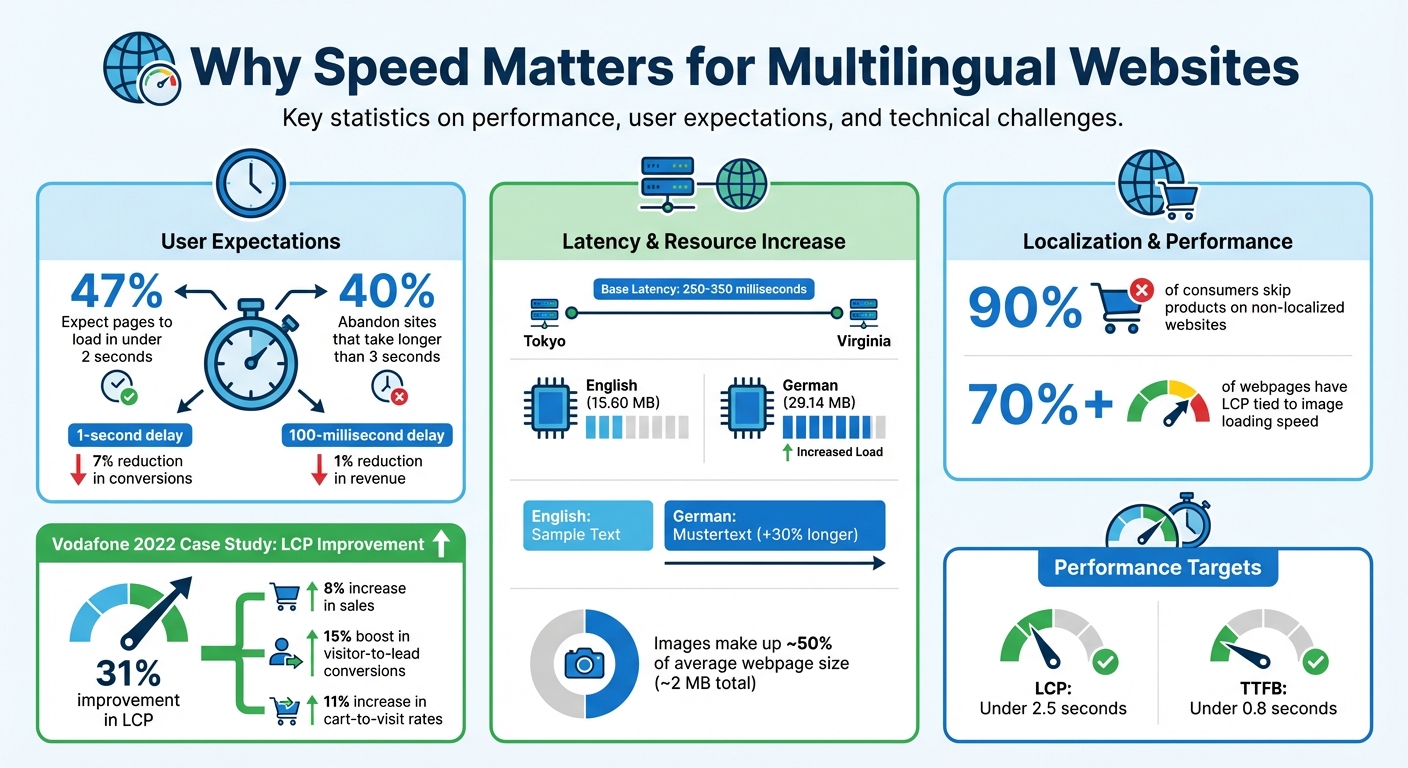
Slow websites lose users. For multilingual sites, the stakes are even higher. Nearly half of users expect pages to load in under 2 seconds, and a 1-second delay can reduce conversions by 7%. Add multiple languages, geographic distances, and heavier files, and your site risks losing both visitors and revenue.
Here’s what matters most:
- Latency: Distance between users and servers increases load times.
- Language files: Translations and localized content add weight to requests.
- Core Web Vitals: Metrics like LCP, CLS, and INP impact SEO rankings.
To fix this, focus on:
- Content Delivery Networks (CDNs): Reduce latency by caching content globally.
- URL Structure: Use subdirectories (
/en/) for easier maintenance and SEO. - Hreflang Tags: Ensure search engines serve the right language version.
- Image Optimization: Compress images with formats like WebP and enable lazy loading.
- Localized Metadata: Tailor keywords, titles, and alt text for each language.
Fast multilingual sites perform better in search rankings, retain users, and drive global growth. Keep reading for actionable strategies to improve speed and user experience.
Multilingual Website Speed Statistics and Performance Impact
How to Build Fast Multilingual Sites with WPML
sbb-itb-8482ffa
Common Performance Challenges for Multilingual Websites
Operating a multilingual website comes with its own set of performance hurdles. Two significant challenges are the physical distance between users and servers, and the added technical complexity of handling multiple languages. Both can slow down page loads, leaving users frustrated before they even get a chance to explore your content.
Latency and Geographic Distance
The farther a user is from your server, the higher the latency. For example, someone in Tokyo trying to access a site hosted in Virginia faces thousands of miles of data travel and multiple network hops. This can result in a base latency of 250–350 milliseconds before the first byte even reaches the user when accessing a North American server.
"Latency grows significantly as physical distance from the origin server increases." - BlazingCDN
On top of that, every HTTP request involves several steps - like DNS lookups, TCP handshakes, and TLS negotiations - all of which add hundreds of milliseconds to the delay. In regions with weaker network infrastructure, such as parts of Southeast Asia or Africa, or on congested mobile networks, these delays can become even worse.
While automatic redirects based on IP location might seem helpful, they can actually complicate the discovery of language-specific pages.
How Multiple Languages Affect Load Speed
Managing multiple languages adds another layer of complexity. Translation files, which are loaded with every request, can slow down server response times. For instance, WordPress benchmarks show that switching from English to German increased memory usage from 15.60 MB to 29.14 MB.
Additionally, storing translations, localized metadata, and different versions of content can lead to database bloat, which slows down query performance. Text expansion is another issue - German text, for example, is often about 30% longer than English. This can cause layout shifts, negatively impacting Core Web Vitals.
Automatic language redirects also add latency and may interfere with search engines' ability to crawl alternate language pages effectively.
Speed Optimization Strategies
Improving performance is critical for ensuring a fast and smooth experience on multilingual websites. Smart technical choices - like the right URL structure and effective use of content delivery - can significantly cut down load times and enhance usability for all language versions.
Choosing the Right URL Structure
The URL structure you choose has a direct effect on both site performance and maintenance needs. Subdirectories (e.g., website.com/en/) consolidate domain authority on a single host, which reduces SSL and infrastructure demands. Alternatively, subdomains (e.g., en.website.com) allow hosting content on different servers closer to specific regions, cutting down latency for users in those areas. However, this approach often requires more upkeep. Country-code top-level domains (ccTLDs), like website.fr, are strong indicators of regional targeting but come with higher resource demands since each domain requires its own hosting, SSL certificates, and infrastructure.
Avoid using URL parameters (e.g., website.com?lang=en) as they complicate indexing and caching processes. Consistency is also key - be sure to standardize trailing slashes to prevent search engines from treating similar URLs as separate pages, which could waste crawl budget. Pairing a solid URL structure with a CDN ensures faster content delivery across regions.
Using Content Delivery Networks (CDNs)
CDNs are essential for reducing latency, especially for multilingual websites. By caching content on servers around the globe, CDNs bring your site closer to users, whether they’re in Brazil, India, or elsewhere. This minimizes the need for users to connect to a distant origin server, which can significantly slow down load times. Studies show that even a 100-millisecond delay can reduce revenue by 1%.
Modern CDNs go beyond simple caching. They use advanced protocols like HTTP/2 and HTTP/3 to handle pages with numerous assets more efficiently. They also apply Brotli compression for text files, convert images to formats like WebP for better performance, and use custom cache keys to serve the correct language version based on a user’s location. For content that can’t be cached, pre-warmed connections between edge and origin servers help speed up data transfer. Plus, these services are more affordable than ever, with rates starting at just $0.004 per GB ($4 per TB), making them accessible to businesses of all sizes.
Implementing Hreflang Tags Correctly
While performance improvements are vital, proper language and regional targeting also play a big role in user experience. Hreflang tags let search engines know which language and region each page is meant for, ensuring users see the right version of your site. However, these tags must be implemented correctly to avoid indexing problems or performance hits. A common issue is missing return links - if Page A links to Page B, Page B must link back to Page A. Each page also needs a self-referencing hreflang tag and should use absolute URLs (e.g., https://example.com/es/) instead of relative ones.
For large websites with thousands of pages, adding hreflang tags via XML sitemaps can help reduce on-page code and improve load times. As Kate Morris from Moz explains:
"I prefer the tags be put in XML sitemaps... to keep the tagging off the page, as any removal of code increases page load time, no matter how small".
Don’t forget to include an hreflang="x-default" tag as a fallback for users whose language isn’t covered. Also, avoid automatic IP-based redirects, as these can block search engine crawlers from indexing your localized pages.
Optimizing Content and Assets for Different Languages
Content and media files play a big role in determining load speed, making their optimization critical for multilingual websites. Images alone often make up nearly half of a webpage's total transfer size, which usually averages around 2 MB. When localized versions of images are added - like region-specific visuals or translated banners - the total file count and load time can increase. This makes optimization essential to reduce delays and ensure smooth performance across all language versions.
Compressing Images and Media Files
Images are often the largest contributors to a webpage's size. On more than 70% of webpages, the Largest Contentful Paint (LCP) - a key user experience metric - is tied to how quickly images load. For multilingual sites, this challenge grows when localized images are added. For example, hero banners with translated text or culturally specific visuals need to be optimized individually for each version.
To tackle this, use modern formats like WebP or AVIF and set JPEG quality to around 85 to strike a balance between quality and file size. For scalable visuals, SVG files are ideal since they retain clarity at any size. However, even SVGs can be made lighter using tools like SVGO, which can cut file size by up to 58%.
Another useful technique is lazy loading, which delays the loading of images below the fold by adding the loading="lazy" attribute. This frees up bandwidth for images and content that appear immediately on the screen. Additionally, use srcset and the <picture> element to serve correctly sized images based on the user’s device. For instance, avoid sending an 800×800 pixel image to a mobile user who only needs a 300×300 version.
These strategies make a big difference. In 2022, Vodafone optimized their images and saw their LCP improve by 31%. This led to an 8% boost in sales, a 15% jump in visitor-to-lead conversions, and an 11% increase in cart-to-visit rates. As web.dev highlights:
"Images are the web's biggest assets in terms of both total transfer size and number of requests per page."
Optimizing Metadata for Each Language
Metadata - such as title tags, meta descriptions, and alt text - directly impacts both search rankings and page load times. For multilingual sites, metadata should be localized with market-specific keyword research instead of relying on literal translations. This ensures it aligns with how native speakers search for information. Keep in mind that text length varies by language: German text, for instance, can expand by 20–30% compared to English, while Chinese, Japanese, and Korean are usually more concise.
To ensure proper display across search engines, aim for title tags around 60 characters and meta descriptions between 50–160 characters. However, different platforms have unique requirements - Baidu in China allows titles up to 80 characters, while Naver in South Korea recommends keeping them under 40 characters.
For image SEO and accessibility, translate and localize alt attributes so they resonate with local audiences. Additionally, declare the correct language in your HTML using the lang attribute (e.g., <html lang="es">) to help browsers and search engines understand the page’s language. When working with Right-to-Left languages like Arabic or Hebrew, ensure the language direction is properly declared to prevent issues with metadata display.
Avoid relying solely on machine translation for metadata. Without human review, machine translations often miss local context, leading to "mixed-language" snippets that can harm trust and click-through rates. Also, each language version should include a self-referencing canonical tag. Pointing all versions to a single English URL can cause search engines to overlook the translated pages entirely.
Tools and Technology for Faster Multilingual Sites
To complement the optimization strategies discussed earlier, the right tools can significantly improve your site's speed and global accessibility. Modern platforms leverage lightweight integrations and global delivery networks to ensure minimal load times. These tools not only enhance performance but also provide ongoing insights to keep your site running smoothly.
How Heylingo Enhances Website Speed
Heylingo simplifies website translation with an efficient approach. It uses a lightweight, asynchronous JavaScript snippet that integrates effortlessly with any CMS or custom platform. Paired with a global CDN, it serves localized translations from servers closest to the user, ensuring fast delivery and reducing strain on your origin server. Additionally, for businesses in the EU, data processing is handled on GDPR-compliant servers in Germany, maintaining strict regulatory standards.
Tracking Performance with Analytics
Integration is just the beginning - monitoring performance is essential to ensure your site meets user expectations. Focus on key metrics like Largest Contentful Paint (LCP) under 2.5 seconds and Time to First Byte (TTFB) under 0.8 seconds. As Google's Barry Pollard and Jeremy Wagner put it:
"Time to First Byte (TTFB) is a foundational web performance metric that precedes every other meaningful user experience metric such as First Contentful Paint (FCP) and Largest Contentful Paint (LCP)."
Leverage tools like Google Search Console and Google Analytics 4 to analyze performance across different languages. By setting up a custom "Language" dimension, you can track localized metrics such as bounce rate, time on page, and conversion rates. This approach has proven effective - NordVPN, for example, saw a 43% increase in sales after analyzing performance in 24 different locales.
For more technical insights, tools like PageSpeed Insights, WebPageTest, and Server-Timing headers can help you monitor factors like DNS lookup, SSL handshake, and server connection times. These checks ensure your CDN operates efficiently and your site remains responsive.
Conclusion
Speed optimization plays a crucial role in the success of multilingual websites in global markets. With 47% of consumers expecting pages to load in two seconds or less - and 40% abandoning sites that take longer than three seconds to load - speed directly impacts user engagement and retention. To address this, key strategies include using a CDN to minimize geographic latency, applying accurate hreflang tags, compressing images with formats like WebP, and adopting a subdirectory URL structure (e.g., example.com/es/) to maintain SEO strength. These tactics not only improve technical performance but also contribute to measurable business growth.
Advancements in tools have made translation and optimization far more accessible. A great example is Heylingo, which combines lightweight JavaScript integration with a global CDN to deliver translations from servers closest to users. This ensures fast load times while managing technical SEO seamlessly, freeing you to focus on growing your business instead of troubleshooting code.
Localization is essential - nine out of ten consumers skip products on non-localized websites. Speed optimization ensures that when you offer a localized experience, it’s delivered without delay. By leveraging strong infrastructure, fine-tuning website assets, and using efficient translation tools like Heylingo, your site can meet the expectations of global audiences and drive international expansion.
FAQs
How do I choose between subdirectories, subdomains, and ccTLDs for languages?
When deciding between subdirectories, subdomains, and ccTLDs, your choice should align with your SEO strategy, technical requirements, and branding objectives.
- Subdirectories (e.g., example.com/fr/) are straightforward to manage and consolidate all domain authority under one roof, which can boost SEO performance.
- Subdomains (e.g., fr.example.com) allow for clearer separation of content but require you to establish authority for each subdomain individually, which can be more challenging.
- ccTLDs (e.g., example.fr) highlight local relevance and can appeal to specific geographic audiences, but they come with added costs and operational complexity.
For many, subdirectories strike a balance between simplicity and SEO benefits, making them a practical option.
How can I cache the correct language version on a CDN without causing SEO issues?
To make sure the right language version is cached on a CDN without running into SEO problems, use content negotiation to serve localized content based on user preferences. Pair this with hreflang tags, which help search engines understand your site's language and regional targeting, avoiding duplicate content issues. You can also use query strings or custom cache keys to handle geolocation-based content delivery effectively. Keeping your site and CDN aligned ensures a smooth user experience and maintains strong SEO performance.
What are the best ways to measure speed per language and region?
To evaluate speed across different languages and regions, leverage multi-location testing tools. These tools measure metrics such as Time to First Byte (TTFB) from various geographic locations, allowing you to pinpoint differences in performance and server response times. This approach helps fine-tune your multilingual website for improved speed worldwide.