7 Tips for Budget-Friendly Website Localization
Want to grow your business internationally without overspending? Website localization is key. Here's why: 76% of consumers prefer buying products in their native language, and 9 out of 10 internet users skip products they can't understand. Localization isn't just about translation - it's about making your site feel local to your audience by adjusting language, currency, and even images. Plus, for every $1 spent on localization, businesses see an average return of $25.
Here are 7 practical tips to localize your website on a budget:
- Focus on Key Markets and Languages: Start with regions where you already see international traffic or potential. Prioritize languages that bring the most value.
- Leverage Automated Tools: Use affordable tools like Heylingo to translate your site quickly and save up to 70% on costs compared to traditional methods.
- Reuse Translations: Translation Memory (TM) ensures you don’t pay twice for repeated phrases, saving time and money.
- Prioritize High-Impact Pages: Begin with product pages, checkout flows, and landing pages that directly influence sales.
- Use Customer Reviews: Translate user-generated content, focusing on top reviews while automating the rest.
- Tailor Visuals: Adjust images, graphics, and layouts to fit local preferences, including text expansion and reading direction.
- Track Performance: Use tools like Google Analytics to monitor how localized pages perform and fine-tune based on data.
Localization doesn’t have to be expensive. By focusing on these cost-effective strategies, you can expand your reach and convert international visitors into loyal customers. Start small, test results, and scale as you grow.
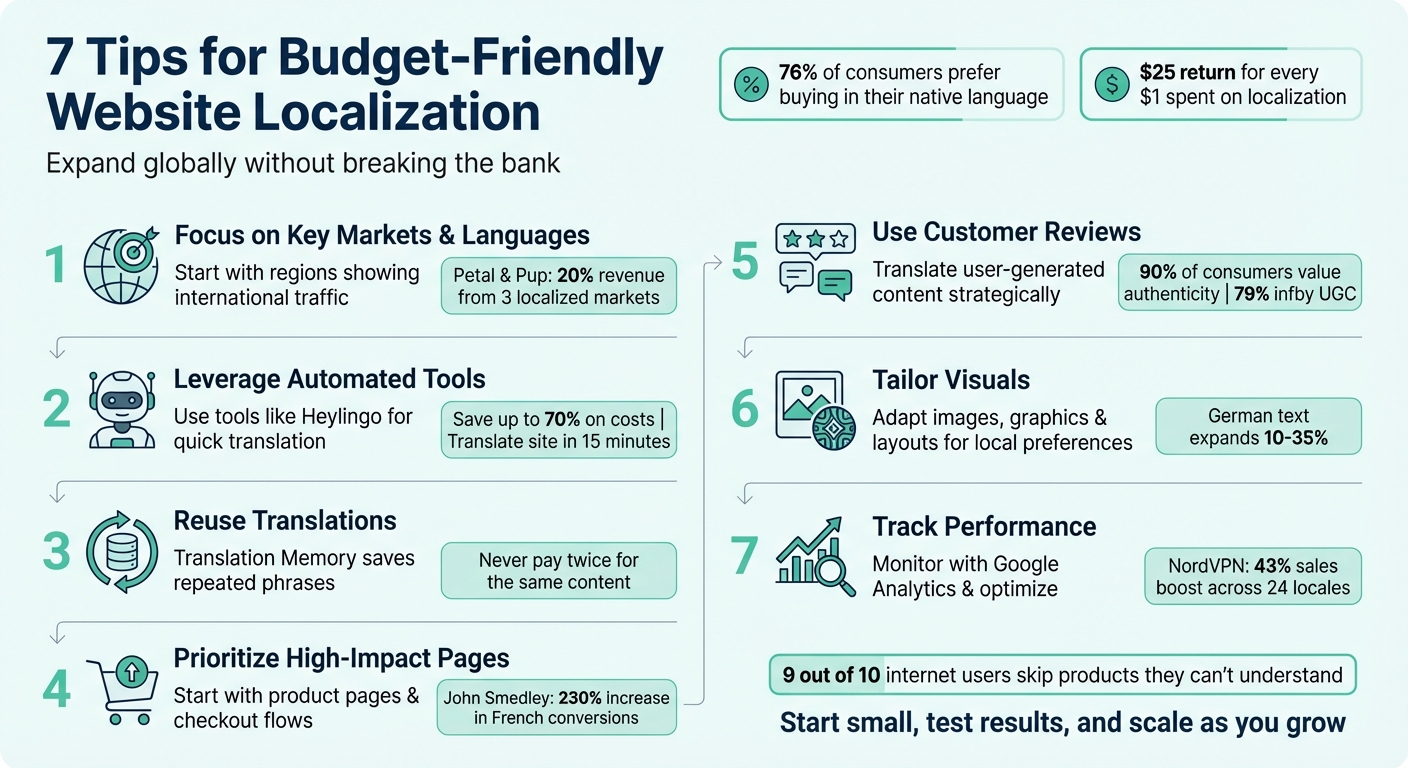
7 Budget-Friendly Website Localization Tips with Key Statistics
Create a Multilingual Website on a Budget | Attracting a Global Audience | How to Build a Website
1. Choose Your Target Markets and Languages First
Before diving into translations, pinpoint the markets and languages that matter most to your business. Instead of trying to localize everything at once, focus your efforts - and budget - on areas with the highest potential. Start by digging into your website analytics to identify where international traffic is coming from and check customer support inquiries for language patterns. These data points can reveal which markets are already interested in your offerings and where localization could have an immediate impact.
For instance, if you're eyeing Germany, translating into German is a no-brainer. But for a diverse region like India, you might need to consider multiple languages such as Hindi, Tamil, and English. A great example of this targeted approach comes from Australian fashion retailer Petal & Pup. In December 2024, they localized for New Zealand, Canada, and the United Arab Emirates, which helped propel international sales to 20% of their total revenue.
Once you've identified the key languages, follow a website localization guide to plan your expansion carefully. A tiered approach works well: prioritize Tier 1 markets for immediate revenue opportunities, Tier 2 for growth potential, and Tier 3 for longer-term strategic investments. For many U.S.-based small and medium businesses, starting with Spanish for Latin America or French for Canada can be a smart first step before tackling more complex languages.
To test the waters, consider running small PPC campaigns in your target language. This can help measure interest before committing to full localization. For example, AS Marketing's Norwegian campaign showcased at the International Marketing Summit 2024 used localized keywords to build trust and boost conversion rates.
It’s also worth noting that 56% of consumers prioritize localized product information over price. By targeting the right markets and languages, you can make localization a strategic investment that drives results without stretching your budget too thin.
2. Use Automated Localization Tools like Heylingo
Automated localization tools can cut your translation costs down to just 10% of what traditional services charge. Unlike human translators who might take weeks, Heylingo can translate your entire website in just 15 minutes. This speed is a game-changer for small businesses that need to act fast without overspending.
Getting started is simple. Heylingo works seamlessly with any CMS, custom platform, or online shop. It even has a dedicated Shopify plugin. The best part? You don’t need coding skills, a site redesign, or any technical expertise. Just add a lightweight script to your site, and Heylingo does the rest - automatically detecting and translating your content into over 30 languages. Any new updates, like blog posts or product descriptions, are translated instantly, keeping all versions of your site up to date without extra effort.
The pricing is another big win for small and medium-sized businesses (SMBs). Heylingo’s Starter plan starts at just €10 per month (roughly $10.50) for 100,000 translated characters. Their Scale plan, which is the most popular, offers 1,000,000 characters for €69 per month (about $72.50). Compare that to traditional human translation rates of $0.08 to $0.25 per word, and the savings are undeniable - up to 70% on total translation costs.
But saving money doesn’t mean sacrificing quality. Pair AI translation with human oversight to strike the perfect balance. High-volume content like product descriptions and blog posts can rely on automated translation, while critical pages like your homepage or checkout can be polished by professionals. Heylingo’s dashboard gives you full control, allowing you to review and edit translations as needed. Plus, it handles technical SEO for you by adding hreflang tags and translating metadata, ensuring your multilingual pages rank well in search engines.
"We placed that first test API order and it came back in seconds. It's such a great feeling to see how easy the process of getting the site translated has become." - Head of International Expansion, Amara
Scalability is another key advantage. As your business grows, you can add more languages without starting from scratch. Heylingo’s translation memory stores your previous translations, so you don’t pay for the same work twice. This makes localization costs predictable and manageable, even as your website expands, helping you plan for international growth with ease.
3. Reuse Translations Across Your Website
Manual vs automatic translation both offer benefits, but automated options can save money, but you can stretch those savings even further by using Translation Memory (TM). TM works by storing every translated phrase and reusing it whenever the same text appears again. This means common phrases like "Add to Cart" or "Free Shipping" only need to be translated once, eliminating redundant costs.
Over time, your TM database becomes an invaluable resource for updating repetitive content in-house. This is especially helpful for small and medium-sized businesses (SMBs) managing product catalogs, navigation menus, or call-to-action buttons across multiple pages.
"Translation memory technology is a big help when cost cutting is top of your priorities list... In time you may actually be able to avoid hiring third parties to handle your translation and do it yourself with the help of your database." - Nima Henry, Content Writer, Localize
But TM isn't just about saving money. It also ensures your brand voice stays consistent. For instance, having the same call-to-action phrased identically across your site avoids confusing variations that could disrupt the user experience. Pairing TM with a terminology glossary further ensures uniform language, cutting down on time-consuming manual edits.
Tools like Heylingo take this a step further by automatically building your TM without requiring manual setup. As your business grows - whether you're adding languages or updating content - this automation keeps localization fast and costs predictable. By reusing translations effectively, you not only save money but also set the stage for a smoother, more efficient localization strategy.
4. Start with Your Most Important Pages
Begin with the pages that matter most - product pages, checkout flows, and high-converting landing pages. By focusing on these, you can manage your budget effectively while seeing immediate results where they count.
Dive into your website analytics to pinpoint markets that attract traffic but struggle with conversions. These are your "low-hanging fruit" opportunities - potential customers who are interested in your products but face language barriers that prevent them from completing their purchases. Targeting these areas can deliver impressive results without overspending. For instance, in March 2025, heritage clothing brand John Smedley saw a 230% increase in French e-commerce conversions after implementing localization efforts.
To streamline your localization efforts, use a tiered strategy:
- Tier 1: Prioritize your homepage, product pages, checkout processes, and essential legal documents like privacy policies. These elements establish trust and directly influence sales.
- Tier 2: Focus on key landing pages and navigation menus that support lead generation and user engagement.
- Tier 3: Save less critical content, like older blog posts, FAQs, and "About Us" pages, for later. These areas don’t require immediate attention.
This structured plan ensures a smooth and localized shopping experience for your customers.
Don’t overlook the importance of localizing currency, date formats (e.g., MM/DD/YYYY), and payment methods. Research highlights that 76% of consumers prefer to shop when information is available in their native language, and 40% won’t buy from sites that aren’t localized. Even small adjustments, such as displaying "$79" instead of "€79" or offering familiar payment options, can significantly reduce cart abandonment.
Once your core pages are optimized, gradually expand to secondary content. This phased approach allows you to test market reactions with smaller ad campaigns before committing to larger budgets, ensuring you get the most value out of every dollar spent.
sbb-itb-8482ffa
5. Use Customer Reviews and Community Content
Customer reviews and testimonials can be a goldmine for budget-conscious localization efforts. Instead of creating all-new content, tap into customer-generated content. Research highlights that 90% of consumers value authenticity when picking brands, while 79% say user-generated content significantly impacts their buying decisions. Just like reusing translation memory saves resources, leveraging reviews offers a cost-effective way to enhance your localization strategy.
However, translating a large volume of reviews can stretch budgets thin. A smart workaround? Use machine translation for most reviews and save professional translation for a select few. Focus your translation team on the top 10 featured reviews or testimonials showcased on your homepage, while automated tools handle the rest. This approach keeps costs in check without sacrificing quality.
"Translating your user-generated content is a way to provide that authentic experience to all consumers, regardless of their native language or location." – Matt Grech, Content Marketing Manager, Smartling
Transparency is key when using machine translation. Always include a disclaimer like "Translated automatically" and give users the option to view the original review. Alternatively, you can offer an opt-in model - show the original language first and let users click a "Translate" button if they want to see it in their language.
To keep things efficient as review volumes grow, automate the translation workflow. Focus on translating recent reviews from the past month, as these are typically the most relevant for shoppers making decisions. This method not only saves time but ensures your localized content stays fresh and impactful.
6. Adapt Images and Media for Local Markets
Following a website translation checklist goes beyond just translating text - your visuals play a big role in creating a truly localized experience. To get started, you can source free, high-quality images from platforms like Pixabay, Pexels, Unsplash, or use Google Images with the 'Usage Rights' filter. Just make sure to verify the licenses before using them.
Representation is crucial when tailoring visuals for different markets. For instance, Clarins features Caucasian models on its French website, while showcasing East Asian models on its Japanese site to better resonate with local audiences. Coca-Cola took a similar approach by adapting its Australian website imagery to highlight bottles chilled on sandy beaches, perfectly aligning with the region's summer vibe. The good news? You don’t need costly photoshoots to achieve this. Simply swapping stock photos to reflect the demographics and cultural context of your target market can work wonders.
If your graphics include embedded text, it's smart to design layouts that can handle text expansion. For example, German translations can make text 10%-35% longer, so plan accordingly.
"These may sound like little details, but this is what makes someone feel the experience was made for them. When those little details are wrong, the shopper notices".
Also, be mindful of how colors and symbols are perceived in different cultures. Red, for example, might represent luck in some regions but danger in others. And if you're targeting markets with right-to-left languages like Arabic or Hebrew, you'll need to adjust layouts and media placement to suit those reading patterns.
To future-proof your localization efforts, keep text separate from graphics. This way, you can translate text strings without having to recreate images from scratch. Using tools like a centralized database or headless CMS can help manage and serve localized assets programmatically, making it easier to expand into new markets later. By fine-tuning your visuals to align with local preferences, you can create a stronger, more relatable connection with your audience.
7. Track Performance and Make Improvements
After launching your localized website, the real work begins - tracking its performance. This step is crucial to ensure your efforts yield results rather than becoming a wasted investment. The good news? You don’t need pricey enterprise tools to get started. Google Analytics 4 (GA4) lets you monitor all language versions of your site under a single property, making cross-market comparisons straightforward. By organizing your site with subdirectories (e.g., yourwebsite.com/fr/), you can consolidate data in one place, creating a clear path to actionable insights.
With tools like GA4 and Google Tag Manager, you can easily track key metrics - such as conversion rates, bounce rates, and revenue by language - without needing advanced coding skills. For instance, if your French pages show significantly higher bounce rates compared to your English ones, it could point to translation issues or a lack of cultural alignment. Real-world examples back this up: in March 2025, heritage brand John Smedley improved French conversion rates by a staggering 230% after refining their e-commerce localization. Similarly, NordVPN saw a 43% boost in sales by identifying and fixing underperforming content across 24 different locales.
"Without a robust analytics framework to measure the impact of your efforts, you're flying blind. You might see an increase in traffic from new regions, but you won't know which markets are truly engaged." – Daniele Patrioli, VP of Marketing, Translated
Use these insights to fine-tune your strategy. For example, test localized landing pages against their English counterparts in the same region to measure the exact revenue impact. If you’re using tools like Heylingo, its dashboard simplifies the process of reviewing and improving translations based on user behavior data. Keep an eye on which pages users tend to exit, analyze your checkout funnel to identify where international customers drop off, and make adjustments as needed. Remember, localization isn’t a one-and-done task - it’s an ongoing cycle of testing, analyzing, and improving based on data.
Conclusion
To recap, localizing your website can open doors to global markets. By focusing on strategies like selecting target markets, automating translations, reusing existing content, prioritizing essential pages, incorporating customer reviews, tailoring visuals, and tracking performance, businesses can achieve impressive results - on average, a $25 return for every $1 spent. Plus, with 76% of consumers favoring purchases when product information is in their native language, the case for localization is clear.
Start by targeting high-impact areas. Focus on key pages and markets that promise the best return on investment. Website translation tools can simplify the process, allowing you to allocate resources toward refining critical content while letting technology handle the rest. Interestingly, 65% of consumers prefer content in their language, even if the translation isn’t flawless. So, don’t get caught up in perfection - what matters is accessibility and understanding. These targeted efforts can quickly transform insights into tangible international growth.
"Localization is often seen as a cost, but... it is one of the most powerful drivers of global growth." – Nataly Kelly, Director of Brand & Communications, Zappi
It’s worth noting that only 25% of the 4.6 billion daily internet users communicate in English. With accessible automation tools like Heylingo, even small and mid-sized businesses can tap into global markets and unlock new revenue streams. Start your localization journey today - experiment, adapt, and refine along the way. Your global audience is waiting.
FAQs
How do I decide which markets and languages to prioritize for website localization?
Choosing the right markets and languages is crucial for keeping your localization efforts efficient and cost-effective. Start by digging into the data: assess the market size, purchasing power, and customer acquisition cost (CAC) for each target region. Focus on areas that promise strong ROI, and don’t overlook factors like cultural fit, legal regulations, and existing traffic patterns in your website analytics.
Take a close look at your own metrics. Identify countries that already generate significant traffic, boast solid conversion rates, or show untapped potential. Sometimes, simple barriers like prices not being displayed in USD or dates not formatted as MM/DD/YYYY can hinder performance. Prioritize the languages spoken in these high-performing markets, and then consider nearby regions with similar linguistic or cultural characteristics.
To test your strategy without a major upfront investment, try a no-code solution like Heylingo. It can translate your site into over 30 languages, adjust currencies to $, and reformat dates and measurements for U.S. users. This approach lets you experiment, track outcomes, and fine-tune your localization plan with minimal risk.
How can automated localization tools help save costs?
Automated localization tools offer a cost-effective solution by delivering quick, machine-based translations at a much lower price than traditional manual services. Instead of paying human translators by the hour, businesses can opt for subscription-based models that instantly handle new or updated content. This not only trims labor costs but also accelerates the time it takes to bring products or services to market.
These tools also help businesses get more value for their money by keeping localization costs manageable while expanding their reach to global audiences. Companies can use automation for bulk translations or less critical content and save human translators for high-priority pages. This approach allows businesses to efficiently scale their multilingual websites without breaking the budget.
How can I measure the success of my website localization efforts?
To measure how well your website localization is performing, keep an eye on metrics that align with your business goals. Start by outlining what you want to achieve - whether it's driving more sales, increasing user engagement, or lowering bounce rates - and then track the indicators that matter most to those objectives.
Here are some key metrics to monitor:
- Traffic and user acquisition: Keep tabs on the number of visits, new users, and referral sources from each localized market. This helps you understand how well you're attracting audiences in different regions.
- Engagement: Look at session duration, pages per session, and bounce rates. These numbers reveal whether visitors are spending time on your site and exploring your content.
- Conversions and sales: Dive into conversion rates, average order value, and total revenue for each market. This gives you a clear picture of the financial return from your localization efforts.
- Customer feedback: Analyze support tickets, satisfaction surveys, and reviews to see how well your localized website is connecting with users.
Tools like Heylingo make it simple to track metrics like traffic, conversions, and revenue for each language version in real time. By regularly comparing data from before and after localization, you'll get a better sense of what's working, where adjustments are needed, and how to get the best return on your investment.