Step-by-Step Guide to Localization Testing
Localization testing ensures your software works properly and feels natural for users in different regions. It’s more than translation - it checks grammar, spelling, tone, layouts, date formats, currencies, and even images to match local preferences. This process prevents issues like broken layouts, confusing translations, or cultural missteps that could harm your brand or revenue.
Key points:
- What it does: Verifies functionality, language accuracy, and local usability.
- Why it matters: 76% of online shoppers prefer content in their language; poor localization can cost billions in lost revenue.
- Challenges: Translation errors, text expansion, and mismatched visuals.
- Steps: Define target locales, set up test environments, create detailed test cases, and use tools like Heylingo for faster testing.
- Tools: Combine automation (for technical checks) with manual reviews (for language and local relevance).
Localization testing is essential for global growth, ensuring your product resonates with users while avoiding costly mistakes.
localization testing with examples in software testing | L10N Testing | testing types
sbb-itb-8482ffa
Preparing for Localization Testing
Before diving into testing, having a well-thought-out plan is essential. Without properly defining the scope, setting up the right environment, or choosing the right tools, you risk wasting valuable time and overlooking critical issues. Here's how to lay the groundwork for effective localization testing.
Define Target Locales and Testing Scope
Start by identifying the specific locales and scope that align with your business goals. Focus on markets that offer the most potential for growth or align with your expansion plans. For example, if you're targeting Germany, France, and Japan, prioritize these locales instead of attempting to cover every language at once. A testing matrix can help ensure you address key regional variations, such as en-US, en-GB, fr-FR, de-DE, and ja-JP.
Using a pilot language strategy can be particularly helpful in spotting early issues. For instance, some languages like German or Finnish tend to expand text length significantly compared to English, while Arabic and Hebrew require right-to-left (RTL) testing. Meanwhile, Chinese and Japanese can test your system’s ability to handle intricate character sets. It's also important to decide whether a "neutral" version of a language suffices or if specific regional variants are needed - Mexican Spanish, for instance, is quite different from Castilian Spanish, and Brazilian Portuguese differs from its European counterpart.
Your testing scope should go beyond just language accuracy. It should include:
- Linguistic accuracy: Grammar, spelling, and tone.
- Functional parity: Correct handling of date formats, currency symbols, and address fields.
- Visual and UI integrity: Identifying issues like truncated text or misaligned layouts.
- Cultural relevance: Using appropriate images, colors, and idioms.
- Legal compliance: Adhering to regulations like GDPR and local privacy laws.
Pay extra attention to high-stakes areas such as checkout processes, sign-up forms, and legal disclaimers - errors here can directly affect revenue or compliance.
Set Up Your Test Environment
A realistic test environment is critical for meaningful results. To replicate actual user experiences, configure region-specific settings for elements like date formats (e.g., MM/DD/YYYY), currency symbols (e.g., $), number formats (e.g., 1,000.50), and measurement units. These small details play a big role in creating an authentic and seamless user experience.
Additionally, externalizing user strings and leveraging pseudo-localization can help identify UI issues, such as text expansion, early in the process.
Choose Your Localization Testing Tools
The success of your localization testing heavily depends on the tools you choose. Opt for tools that support the specific languages, regions, time zones, currencies, and date formats relevant to your target markets. It's also important that the tools allow testing on real devices, browsers, and operating systems to ensure proper rendering of fonts, special characters, and layouts.
Heylingo offers a streamlined solution by translating your website into over 30 languages in just five minutes - no coding or redesign required. Compatible with any website, CMS, or online shop, Heylingo even has a Shopify plugin. Its intuitive dashboard allows you to review and fine-tune translations while benefiting from fast CDN servers and GDPR-compliant handling. This makes it simple to test your site across multiple locales without juggling various platforms or workflows.
When evaluating tools, keep in mind:
- Compatibility with automation frameworks like Selenium or Playwright.
- Seamless integration with CI/CD pipelines and bug-tracking tools like Jira or Slack.
- Robust reporting features with locale-specific logs and screenshots.
For enterprise-level projects, prioritize tools with data encryption, role-based access control, and compliance with regional privacy laws. If your project involves location-based content, geolocation simulation is a must-have for testing IP-based redirects or GPS-dependent features. By selecting the right tools, you’ll streamline your localization testing process and ensure it’s flexible enough to adapt to your needs.
Step-by-Step Localization Testing Process
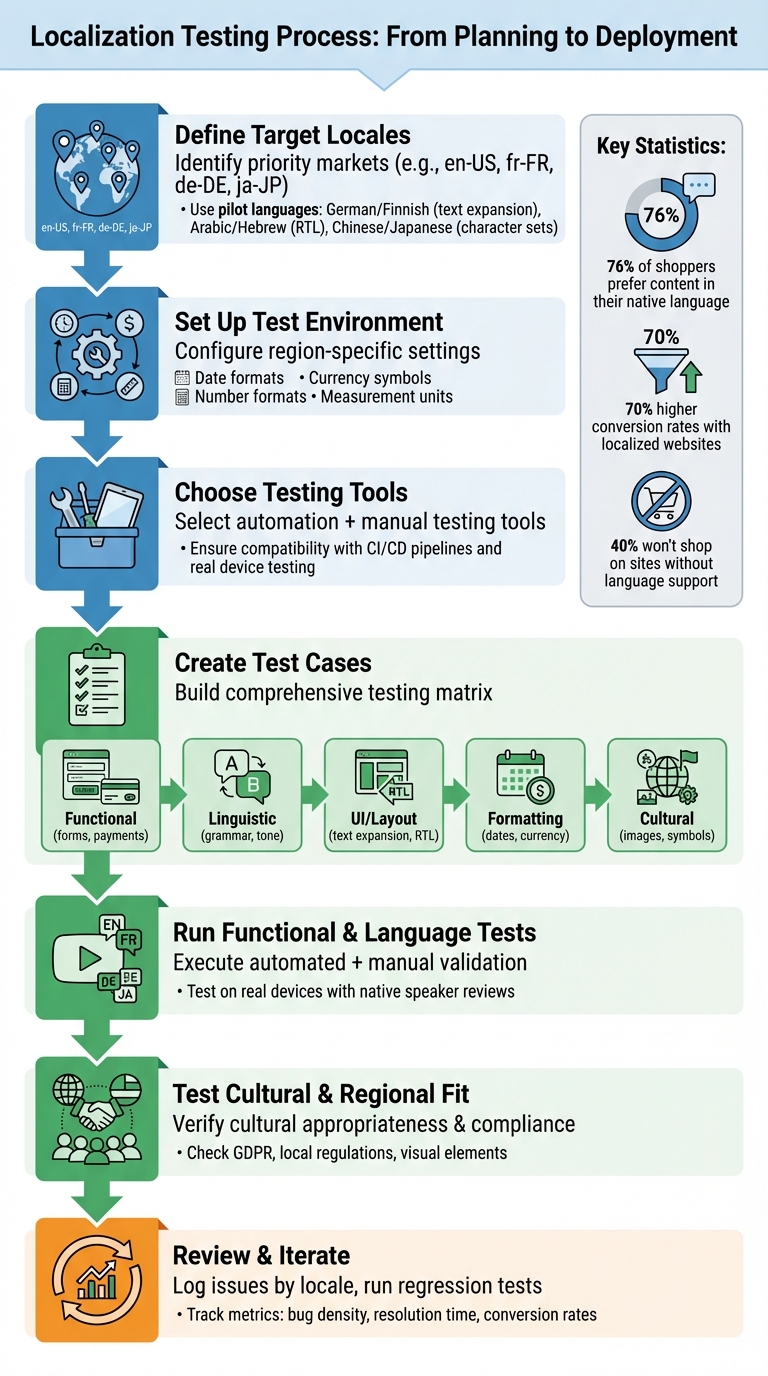
Localization Testing Process: 7-Step Workflow Guide
Once your environment is set up and the tools are ready, you can begin the testing process. This structured approach ensures your localized content functions correctly while resonating with your audience. Below, we break down how to create effective test cases that cover both technical and cultural aspects.
Create Your Test Cases
Developing detailed test cases is essential for localization testing. Start by building a testing matrix that includes all target locales (e.g., en-US, fr-FR, de-DE) and the specific features to validate.
Your test cases should address:
- Functional testing: Validate features like form inputs, payment processes, and region-specific requirements. For example, US phone numbers often require 10 digits, while German numbers might need up to 12. Similarly, postal code formats differ - US ZIP codes use a five-digit format, while UK postcodes combine letters and numbers. Ensure checkout flows support local payment methods and display the correct currency symbols (e.g., $ for USD).
- Linguistic accuracy: Check grammar, spelling, and tone to maintain brand consistency. Context matters here - ensure terms like "checkout" are translated appropriately (e.g., as "payment" rather than something misleading). Studies show that 76% of online shoppers prefer websites in their native language, highlighting the importance of translation quality.
- UI and layout integrity: Test for issues like text expansion, right-to-left (RTL) support for languages like Arabic, and overlapping elements. Buttons, forms, and navigation should remain functional and visually clear.
- Cultural relevance: Review images, symbols, and colors to ensure they align with local norms. For example, idioms and humor should be adapted, not directly translated. Validate formatting for dates (e.g., MM/DD/YYYY for the US vs. DD/MM/YYYY for Europe), time (12-hour vs. 24-hour), and numbers (commas vs. periods as separators).
Use localized test data, including names with special characters, local addresses, and plural forms. For instance, Arabic has six plural forms, so test with counts like 0, 1, 2, 5, 11, and 101 to ensure grammatical accuracy.
| QA Area | Specific Test Case Focus | Potential Issue to Catch |
|---|---|---|
| Functional | Form validation (phone/address) | Blocked sign-ups due to digit limits |
| Linguistic | Tone, grammar, and terminology | Literal translations that alter meaning |
| Visual/UI | Text expansion and RTL support | Overlapping or truncated text |
| Formatting | Dates, currency, and numbers | Incorrect currency causing confusion |
| Cultural | Images, symbols, and colors | Offensive or inappropriate visuals |
Introduce pseudo-localization early in the process. This involves using artificially modified text (e.g., "[Šëééñtttiñgssššš]") to identify UI issues, hardcoded strings, and font rendering problems before professional translations are applied.
Run Functional and Language Tests
Once test cases are ready, execute functional and linguistic validations simultaneously. Ensure that features such as forms, buttons, links, and payment systems work consistently across all language versions. Locale-specific formatting for dates, currency, and numbers should display correctly.
Perform an in-context review to verify translation accuracy directly within the interface. This helps catch issues like truncation, clipping, or incorrect context that only become visible in the live UI. Native speakers are crucial for in-context reviews, as they can identify cultural nuances, slang, and natural language flow.
Test on real devices rather than emulators. This is especially important for regions with unique input methods (IMEs), such as East Asia, where input systems require additional validation. Also, ensure search functionality and sorting rules follow local conventions, like stroke order for Chinese or specific character sorting in Nordic languages.
Localized websites can see up to 70% higher conversion rates in their target markets, so thorough functional and language testing directly impacts business performance.
Test for Cultural and Regional Fit
Beyond technical accuracy, cultural alignment is critical. Review visual elements like images, icons, and symbols to ensure they are appropriate for the target audience. Something harmless in one region could be offensive in another.
Match the level of formality to the expectations of the target culture. Slogans and idioms should be adapted thoughtfully to avoid losing meaning or sounding awkward.
Additionally, test compliance with local regulations. For example, ensure your site adheres to laws like GDPR, includes necessary disclaimers, and meets regional requirements. Research political sensitivities to avoid using imagery or language that could spark controversy.
Tools like Heylingo simplify this process by offering a dashboard where translations can be reviewed and adjusted in context. After automatically translating your content into over 30 languages, you can fine-tune cultural elements and preview changes as they appear to users - removing guesswork and creating a seamless localized experience.
It's worth noting that 40% of global users will not shop on websites in languages they don't understand, and 86% of localized marketing campaigns outperform English-only campaigns in engagement and conversions. Proper cultural testing not only builds trust but also enhances the user experience and drives better results for your business.
Using Automation and Tools for Faster Testing
Once you've ensured your content is relevant to your audience, automation can speed up technical checks and fit naturally into your ongoing development process. By automating repetitive tasks, localization testing becomes much more efficient. Human testers still play a key role, especially when it comes to cultural nuances and brand tone, but automation takes care of the technical side, reducing the workload on your team.
Automation vs. Manual Testing: What to Know
Automation shines when it comes to tasks that need to be repeated consistently and across multiple environments. It’s ideal for functional regression, checking date and currency formats, input validation, and layout testing. For example, automated tools can run the same test case across dozens of browser and operating system combinations at the same time. This helps catch technical errors, like a button showing "BTN_SUBMIT" instead of "Submit" due to a missing resource key.
On the other hand, manual testing is crucial for reviewing linguistic quality, cultural fit, and tone. Native speakers can assess translation fluency, humor, and context-specific elements that automation might miss. They also ensure that the content feels natural and relatable to the target audience.
The best results come from combining both methods. Automation can handle technical tasks like input validation (e.g., ensuring dates display in the MM/DD/YYYY format in the U.S.) and spotting text overflow in UI components. Meanwhile, manual testing ensures the overall user experience aligns with cultural expectations and maintains the brand’s voice.
| Testing Method | Best For | Limitations |
|---|---|---|
| Automated | Technical checks like encoding, format validation, and layout consistency | Misses subtle contextual or cultural errors |
| Manual | Linguistic quality, cultural fit, and user experience | Time-intensive, costly, and less scalable for large projects |
To make automated tests more effective, use unique element IDs (e.g., data-testid="submit-button") rather than text-based locators. This prevents tests from breaking when content changes language. Additionally, configure your WebDriver to pass the Accept-Language header, ensuring the UI displays in the correct language for testing.
This combination of automation and manual testing integrates easily into your development workflow, as discussed in the next section on CI/CD integration.
How Heylingo Simplifies Localization Testing
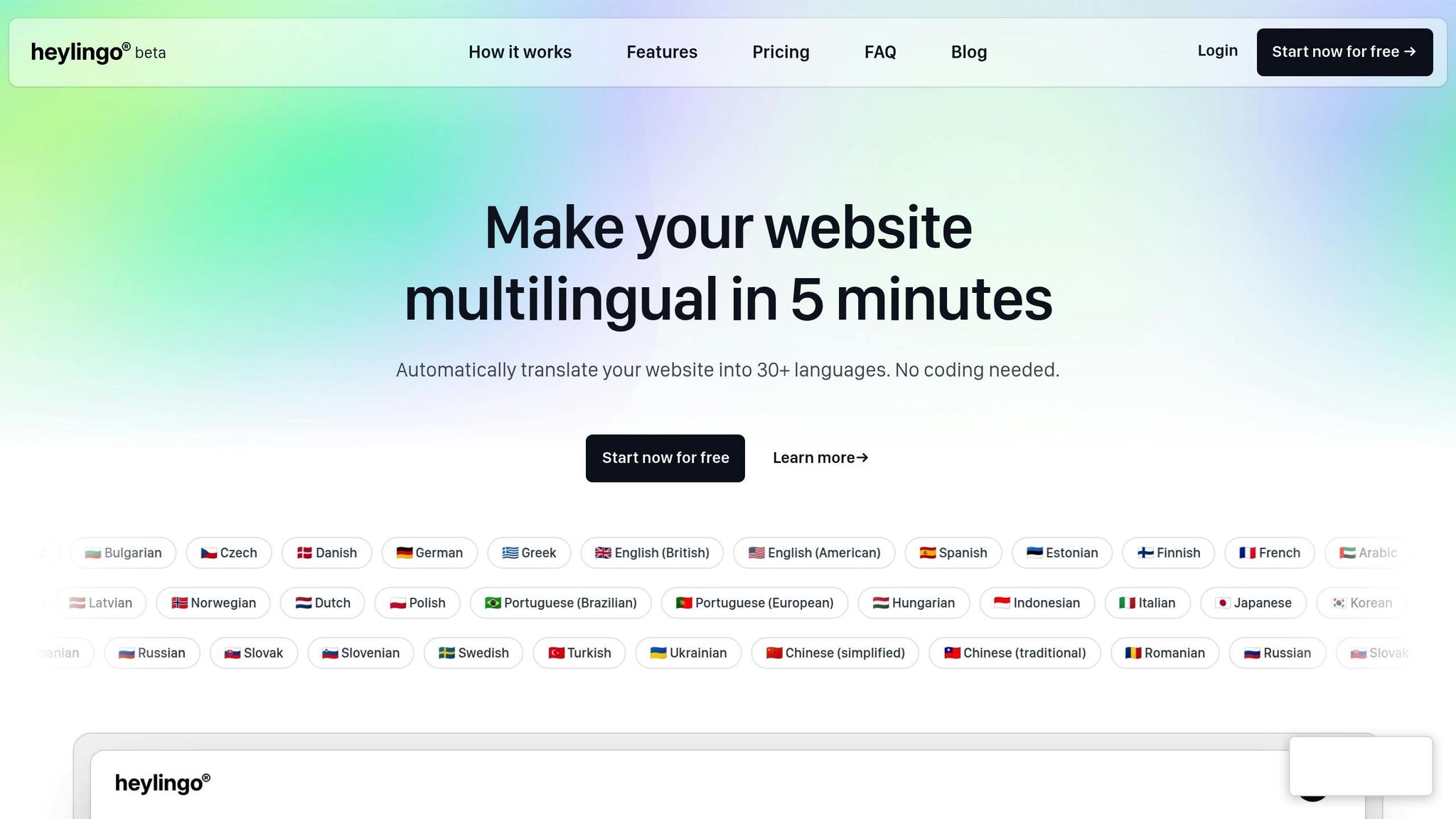
Heylingo takes automated testing to the next level by combining AI-powered translation with manual adjustments for cultural accuracy. With a simple script added to your site, Heylingo can translate your content into over 30 languages in just minutes - no coding required.
The platform offers an in-context preview, allowing you to immediately identify layout problems like text overflow, truncation, or misalignment. You can also manually tweak translations to refine tone, adjust for cultural differences, or fix terminology, ensuring the localized version matches your original content in quality.
Heylingo also includes automated quality checks to catch common issues such as untranslated strings, placeholder errors, and punctuation problems before your content goes live. By automating these technical checks, Heylingo frees up your team to focus on refining the user experience, saving both time and money compared to traditional methods.
Add Testing to Your CI/CD Pipeline
Incorporating localization testing into your continuous integration and delivery (CI/CD) pipeline ensures that quality checks happen with every code update. This "shift-left" approach identifies internationalization issues early in the development process, helping you avoid costly fixes later on.
Set up automated tests to run with every pull request. These tests can validate that new code doesn’t disrupt existing translations or introduce hardcoded strings. Pseudo-localization (e.g., "[Šëééñtttiñgssššš]") can help you spot UI issues, font rendering problems, and text expansion challenges early. This is particularly important for languages like German or Finnish, which can expand text length by 30–40% compared to English.
You can also configure your pipeline to automatically generate screenshots of key screens in every language. These visuals allow native linguists to review translations without needing to navigate the full application. Finally, integrate your localization tools with platforms like GitHub, Jira, and Slack. This way, localization bugs are seamlessly added to your existing ticketing systems. By making localization a continuous part of your workflow, you maintain quality without slowing down development.
Reviewing Results and Making Improvements
Once testing is complete, a detailed review process ensures localization quality and guides future updates. This step is about transforming test findings into actionable fixes that improve your localization efforts over time. Without a structured approach, recurring issues could undermine your progress in future releases.
Log and Organize Issues by Locale
Begin by sorting all detected bugs by their specific language or region. This method helps you identify recurring problems - like layout glitches in your German version or persistent checkout issues in the French version. By spotting these patterns, you can zero in on areas that need the most attention. Each bug report should include all necessary details: screenshots, video recordings, and clear reproduction steps. This ensures developers have everything they need to resolve issues efficiently.
To avoid confusion when working across multiple locales, assign unique test case IDs to each scenario. Incorporate these bug reports into tools like Jira, GitHub, or Slack, so localization issues integrate seamlessly into your existing development process. This keeps the team aligned and accelerates issue resolution.
"76% of all customers preferred to purchase from websites in their language." - CSA Research
Run Regression Tests After Fixes
After applying fixes, retest thoroughly to confirm that the issues are resolved and no new problems have emerged. Make localization checks a standard part of every pre-release cycle. Combine automated testing for functional consistency with manual reviews by native speakers to catch linguistic and regional nuances that automation might miss.
Use screenshot comparison tools to identify UI layout changes, such as text overflow or alignment issues, especially after string updates. For languages like German or Finnish - where translations are often 30% to 40% longer than English - this step is crucial. Start with a small set of pilot languages, such as German for text expansion or Arabic for right-to-left layouts, to uncover systemic issues before scaling up to all target markets.
Once fixes are verified, evaluate the results to identify areas for process improvement.
Track Metrics and Improve Your Process
Tracking key metrics helps you pinpoint weaknesses in your localization efforts and make a case for additional resources. Focus on these metrics:
| Metric | What It Measures | Business Impact |
|---|---|---|
| Bug Density | Number of issues per language version | Highlights translation or workflow problems |
| Post-Release Volume | Bugs reported by users after launch | Assesses QA effectiveness and uncovers missed cases |
| Resolution Time | Time taken to fix locale-specific bugs | Reflects feedback loop efficiency |
| Conversion Rate | Sales or sign-ups by region | Links localization quality to user behavior and revenue |
For example, tracking bug density by locale can reveal if certain languages consistently have more issues. Monitoring resolution time shows how effectively your team is addressing problems. Low conversion rates in high-traffic locales might indicate broken checkout processes or poor translations. By keeping an eye on these metrics and refining your approach, you can catch problems earlier, save on costs, and deliver a smoother user experience across all markets.
Conclusion
Localization Testing Essentials
To achieve effective localization testing, start with clearly defined target locales and establish test environments that mimic real-world conditions. Develop precise test cases that focus on both functional and linguistic aspects, ensuring the content aligns with regional standards and resonates with local audiences. While automated tools are excellent for repetitive tasks, manual reviews by native speakers are essential to catch subtleties that automation might overlook. Platforms like Heylingo simplify this process by offering an intuitive dashboard for reviewing and refining translations across 30+ languages, cutting down on technical hurdles while maintaining high-quality results.
Localization testing should go beyond verifying translations. It must ensure that elements like dates, currencies, measurement units, and layouts are accurate and meet regional expectations. Testing on actual devices under real network conditions provides a more authentic user experience, helping to identify potential issues before launch. These steps collectively enhance the quality of localized content and contribute to achieving measurable business outcomes.
Business Impact of Localization Testing
Localization testing isn't just about accuracy - it directly impacts financial performance and brand reputation. Studies reveal that 76% of online shoppers prefer websites in their native language, and over 40% refuse to shop on sites that lack language support. Additionally, localized websites can experience up to a 70% boost in conversion rates in target markets.
"Localization testing is now a business-critical need... users expect localized digital experiences, and businesses that fail to deliver risk losing trust and conversions."
- Salman Khan, Test Automation Evangelist, TestMu AI
Beyond increasing revenue, thorough localization testing minimizes support costs by reducing user confusion, builds trust by respecting local norms, and prevents costly public relations errors. Companies that prioritize localization testing as part of their development process can expand into new markets more efficiently, transforming international growth into a strategic advantage by blending technical precision with cultural sensitivity.
FAQs
Which locales should I test first?
Start localization testing with key regions that matter most to your business, such as areas with a large user base or markets like the United States, Canada, and Australia. Focus on regions with noticeable linguistic or cultural differences from your main market. This ensures translations are accurate, culturally appropriate, and technically sound. Testing these areas first helps identify and fix major issues early, paving the way for a smooth user experience.
What should I automate vs. review manually?
Automate tasks that are repetitive and predictable, such as checking for missing translations, validating formats for dates, times, and currencies, and ensuring that the user interface remains consistent across different locales. Automation is particularly effective for large-scale regression testing and layout checks.
On the other hand, nuanced elements require a manual touch. This includes reviewing linguistic accuracy, assessing how well idiomatic expressions fit, ensuring cultural relevance, and aligning visuals with text. For these aspects, native speakers or testers with deep cultural knowledge are essential to make sure the content feels natural and appropriate for the intended audience.
How do I catch layout issues from text expansion or RTL?
To spot layout problems caused by text expansion or right-to-left (RTL) languages, start by using RTL placeholder text. This lets you test reversed text flow and character shaping effectively. Next, apply pseudo-localization to mimic longer text, helping you identify any overlaps or broken layouts. Lastly, conduct visual checks on various devices and browsers to confirm that UI elements adjust as they should. Following these steps ensures your design remains functional and visually consistent with translations and RTL scripts.