Ultimate Guide to Post-Translation Editing
Post-Translation Editing (PTE) refines machine-translated text to meet human standards. It’s faster than traditional translation, with linguists correcting errors, improving readability, and ensuring accuracy. Businesses benefit from cost savings (30–50%) and increased efficiency, processing up to 5,000 words daily. Choose between two editing levels:
- Light Post-Editing (LPE): Fixes basic errors for internal or short-lived content (800–1,500 words/hour).
- Full Post-Editing (FPE): Delivers polished, human-like quality for customer-facing materials (600–800 words/hour).
Preparation is key: start with clear source text, use glossaries, style guides, and translation memories, and leverage tools like QA checkers and website translation tools for small businesses. Track productivity (e.g., Words Per Hour, Post-Editing Distance) and integrate feedback to improve workflows and machine translation quality.
This guide covers practical steps, tools, and best practices to optimize your post-translation editing process.
Do You Need Light or Deep Post Editing?
sbb-itb-8482ffa
How to Prepare for Post-Translation Editing
Preparation is the backbone of ensuring high-quality results in post-translation editing. By following a structured approach, you can streamline the process and achieve better outcomes.
Creating Clear Source Text
The quality of your final translation heavily depends on the clarity of the original text. As Smartling aptly states, "Your output will only be as good as your input". A poorly written source text increases the workload for editors and amplifies the chances of errors across multiple languages.
Start by simplifying your language. Break down long, complex sentences and eliminate unnecessary jargon. This makes the content easier for both translation tools and human editors to interpret [10, 11]. Next, focus on standardizing terminology. A glossary of key terms, technical phrases, and product names ensures consistency throughout the translation process [10, 11]. For instance, using "dashboard" in some places and "control panel" in others creates confusion for translators.
Avoid cultural references that may not translate well. Phrases like "hit the ground running", along with slang, region-specific holidays, and local humor, often lack direct equivalents in other languages. Replace them with straightforward alternatives that retain the intended meaning. Additionally, clarify ambiguous phrases by providing translator notes or visual aids to reduce guesswork [10, 12].
Before moving forward, review your source text for typos, grammatical issues, and inconsistencies [11, 12]. It’s also essential to ensure that your layouts can handle text expansion (common in languages like German or Russian) or contraction (as seen in Chinese or Japanese).
Once your source text is in top shape, it's time to equip your team with the right tools and resources.
Setting Up Your Editing Resources
Providing editors with the right tools and references is crucial for efficient post-translation editing. A Translation Management System (TMS) is a must-have. It integrates machine translation engines, glossaries, and translation memories into a unified workflow, keeping everything organized and easy to access [1, 4, 14].
Your glossary should include approved terms, product names, and industry-specific vocabulary. It should also feature a "do-not-translate" list for elements like brand names, hashtags, and trademarked phrases that need to remain unchanged [15, 21]. Brandon Fiegoli, Senior Product Manager at Butterfly Network, emphasizes the importance of an up-to-date glossary: "The glossary is a living, breathing document. We update it regularly to ensure our translations are as accurate as possible". His team managed to translate 75,000 words in just 10 days by building strong linguistic assets before starting the project.
A Translation Memory (TM) is another essential tool. It stores previously approved translations, which can be reused to maintain consistency and reduce editing time [1, 14]. Additionally, a style guide is vital for defining tone, sentence structure, and formatting rules. For example, it should specify U.S. date formats (MM/DD/YYYY) and currency symbols ($) [4, 14, 15]. Finally, set up Quality Assurance (QA) checkers to catch objective errors like double spaces, missing punctuation, or incorrect numbers after human editing.
Here’s a quick summary of the key resources:
| Resource | Primary Function | Key Elements Included |
|---|---|---|
| Glossary | Terminology Standardization | Product names, technical terms, brand-specific vocabulary, "do-not-translate" lists [17, 18] |
| Style Guide | Voice and Tone Alignment | Tone of voice (formal or casual), grammar rules, punctuation, date/time formatting [17, 19] |
| Translation Memory | Efficiency and Consistency | Database of approved translations for reuse to align with past work [14, 21] |
2 Types of Post-Translation Editing
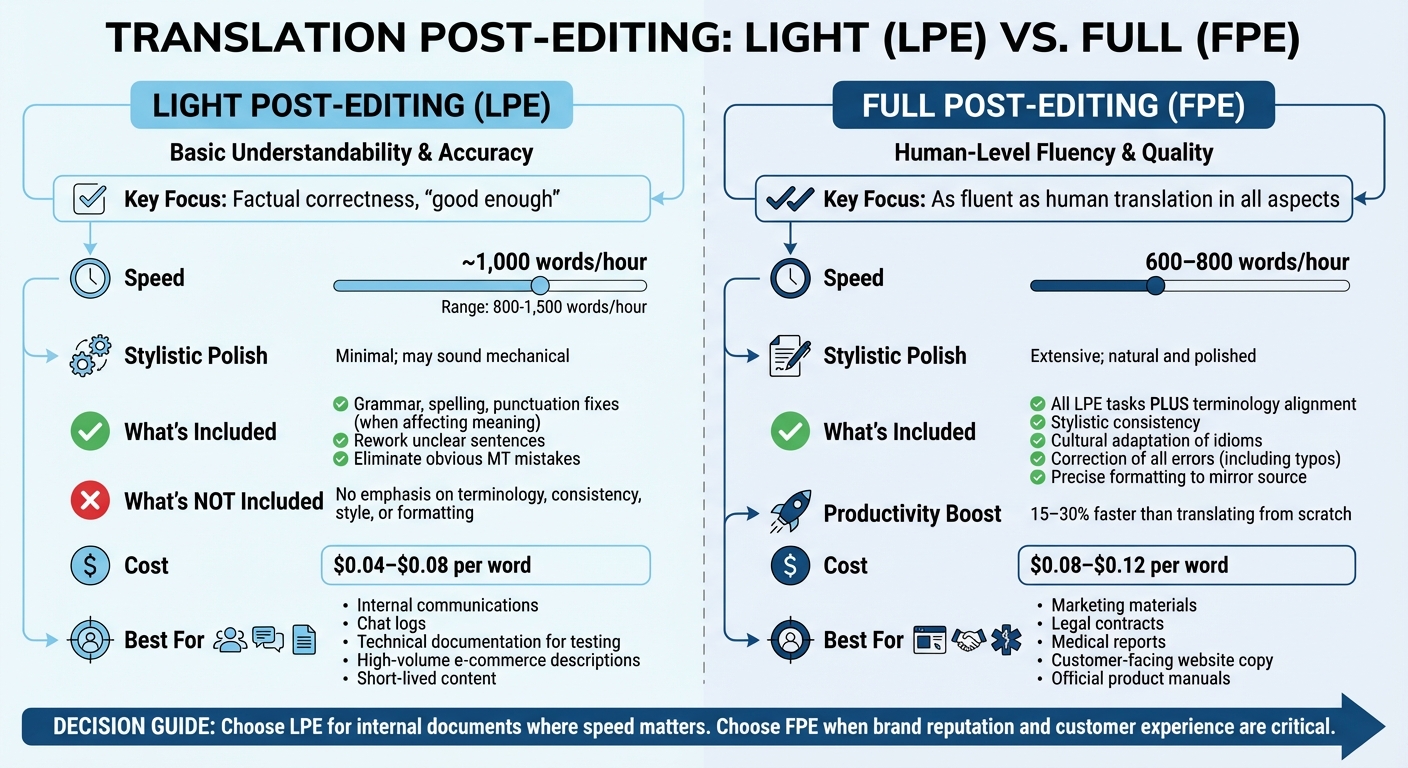
Light vs Full Post-Editing: Speed, Cost and Use Cases Comparison
When deciding between Light Post-Editing (LPE) and Full Post-Editing (FPE), consider your goals, budget, and audience. Each method offers a unique balance of speed, cost, and quality, making it essential to choose the right one for your needs.
Light Post-Editing (LPE)
Light post-editing focuses on fixing errors that hinder comprehension. As David Hetling, Marketing Director for Regulated Industries at RWS, puts it:
"The key phrases for light post-editing are 'factual correctness' and 'good enough'".
Editors in this process address grammar, spelling, and punctuation issues only when they affect meaning. They also rework unclear sentences and eliminate obvious machine translation mistakes. However, they avoid refining tone or structure, which can leave the text sounding mechanical [27, 29].
LPE is a quick process - linguists can handle around 1,000 words per hour, sometimes reaching between 800 and 1,500 words depending on the content and machine translation quality [1, 6]. It’s best suited for internal communications, chat logs, technical documentation for testing, high-volume e-commerce product descriptions, or other short-lived content.
One challenge with LPE is avoiding the "perfectionist trap" - the temptation to over-edit. Kimberly Miller, COO of Argo Translation, explains:
"Light post-editing has a different objective... with no emphasis on terminology, consistency, style, or formatting".
For content that requires a polished, professional touch, a more thorough approach is necessary.
Full Post-Editing (FPE)
Full Post-Editing (FPE) goes beyond LPE by treating the machine-generated text as a draft that needs significant refinement. Building on the basics of LPE, this method focuses on improving tone, style, and cultural nuances to create content that feels entirely human [24, 26].
FPE involves all LPE tasks but adds layers of detail. Editors ensure terminology aligns with approved glossaries, maintain stylistic consistency, adapt idioms and cultural references, and correct even the smallest errors, such as typos or punctuation issues. They also format the text to mirror the source document precisely.
This detailed process is slower - typically covering 600–800 words per hour - but still offers a 15–30% boost in productivity compared to starting from scratch [1, 6]. According to VILLAM Language Services:
"Full post-edited content should be as fluent as manual vs automatic translation comparisons often demand in all aspects. Therefore, the content must meet the quality criteria defined by the client for human translations".
FPE is ideal for marketing materials, legal contracts, medical reports, customer-facing website copy, and official product manuals - any content where precision and brand reputation are critical [24, 26]. As Jakub Absolon, CEO, highlights:
"Full post-editing is simply human translation and should be priced and timed as such".
| Feature | Light Post-Editing (LPE) | Full Post-Editing (FPE) |
|---|---|---|
| Goal | Basic understandability and factual accuracy | Human-level fluency and quality |
| Stylistic Polish | Minimal; may sound mechanical | Extensive; natural and polished |
| Speed | ~1,000 words/hour | 600–800 words/hour |
| Use Case | Internal documents, chat logs, e-commerce descriptions | Marketing content, legal/medical docs, product manuals |
| Cost | $0.04–$0.08 per word | $0.08–$0.12 per word |
Ultimately, the choice between LPE and FPE depends on your audience and how much impact errors might have. For internal documents, LPE often suffices. However, customer-facing content typically demands the thorough review and refinement that FPE provides.
Post-Translation Editing Best Practices
Effective post-translation editing is all about striking the right balance between speed, accuracy, and quality. The difference between an average result and a polished final product often lies in following a few essential principles.
Know Your Content's Purpose and Audience
Before diving into edits, take a moment to understand who the content is for and what it’s supposed to achieve. A technical manual for engineers will have completely different requirements than a marketing email aimed at potential customers. Post-Translation Editing (MTPE) combines the speed of machine translation with the precision of human oversight, but only if the editor is clear on the content's purpose.
Start by creating a style guide tailored to the project. This should outline the tone (formal or informal), regional conventions (like date or currency formats), and any terminology to avoid. For instance, in German translations, you might need to decide between formal "Sie" and informal "du" depending on the brand's voice. Without these guidelines, editors could waste time second-guessing or applying inconsistent standards.
Before jumping into detailed edits, do a quick review of the machine-translated text alongside the original. This helps you gauge the translation's overall quality, spot any nonsensical phrases, and identify major omissions. From there, you can decide whether the content needs light editing or a more thorough overhaul.
How to Edit Without Changing Too Much or Too Little
One of the toughest parts of post-translation editing is finding the sweet spot between doing too much and not enough. Stephen Whiteley from Quicksilver Translate explains it well:
"Stick to the 'minimal edit principle': Edit only to correct errors or improve readability."
This approach ensures efficiency without compromising quality. If a sentence is accurate, grammatically correct, and fits the desired tone, there’s no need to rewrite it. Over-editing wastes time and may even introduce new errors, while under-editing risks leaving subtle mistakes untouched.
Pay special attention to ambiguous words, like "bank", which could mean a financial institution or the side of a river. Always check the surrounding context to ensure the translation makes sense. Reading the text aloud can also help you catch awkward phrasing or "translationese" - sentences that look fine on paper but feel unnatural when spoken.
Fixing Common Machine Translation Mistakes
Machine translation engines often make predictable errors. Recognizing these patterns can make corrections faster and more efficient. Here are some common issues and ways to address them:
| Error Type | Description | Correction Strategy |
|---|---|---|
| Grammar/Syntax | Issues with word order, pronouns, or awkward phrasing | Rewrite for smoother, more natural fluency |
| Lexical Errors | Literal translations of idioms or poor word choices | Cross-check with the source and approved glossaries |
| Omissions | Missing words or phrases from the source text | Ensure all source elements are included |
| Additions | Adding details not present in the original | Compare carefully with the source text |
| Formatting Issues | Problems with spacing, punctuation, or capitalization | Follow the style guide for consistent formatting |
| Terminology Inconsistency | Using different terms for the same concept | Rely on glossaries and translation memories |
Be extra cautious with high-risk elements like numbers, dates, and technical tags. For example, a machine might incorrectly translate "$1,500" as "$15,000" or misinterpret a date like "5/1" (May 1 in the U.S. but January 5 elsewhere). To avoid confusion, consider using fully spelled-out dates like "May 1" in the source text.
Automated Quality Assurance (QA) tools can also help by flagging objective issues like double spaces, missing punctuation, or inconsistent formatting. While these tools won’t replace human judgment, they allow you to focus on the finer details - like ensuring the tone feels right or refining references to match the audience. Together, these practices ensure your editing process is as thorough and efficient as possible.
Tools That Speed Up Post-Translation Editing
The right tools can simplify post-translation editing by automating repetitive tasks, allowing editors to concentrate on polishing tone and ensuring accuracy. These resources enhance the workflow, building on the basics discussed earlier.
How to Edit Translations in Heylingo
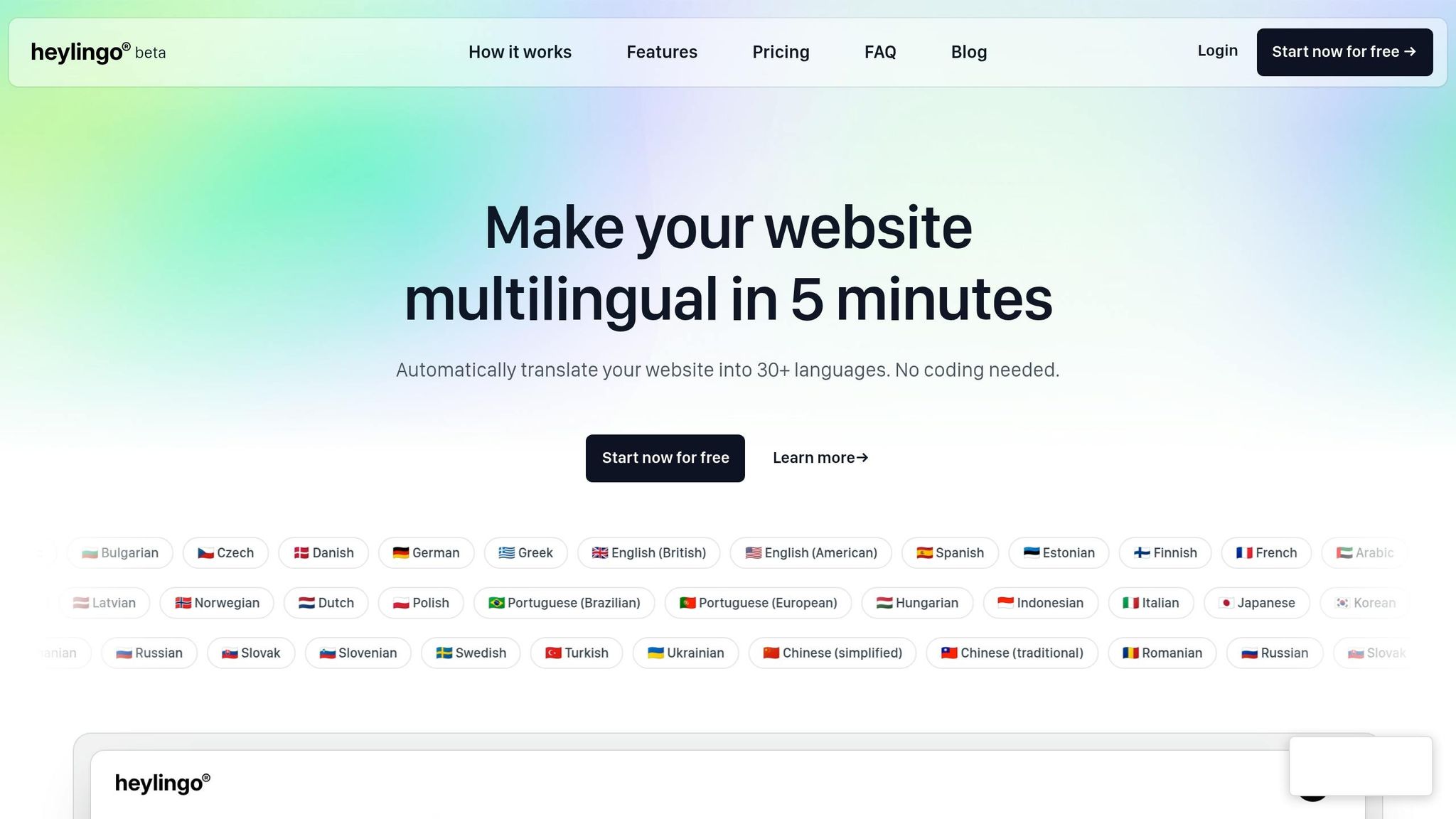
Heylingo offers a user-friendly dashboard where you can review and refine machine-generated translations for your website. With seamless integration, the platform instantly detects and translates content into over 30 languages.
Editing is simple: log into your dashboard, choose the language you want to adjust, and browse through the translated text. You can tweak or completely rewrite any phrase, sentence, or paragraph to align with your brand's voice. As Heylingo puts it, "All translations can be fine-tuned or overwritten anytime through your personal Heylingo dashboard, so your brand's tone is always perfect". This intuitive interface supports efficient editing, ensuring your content maintains a consistent tone.
Heylingo also accommodates single-page applications and dynamic content by offering an integrated refresh trigger to update new material. It works with any CMS or online shop, and all paid plans allow unlimited team members, making collaboration effortless.
Using Translation Memories and Quality Assurance Tools
In addition to Heylingo's dashboard, Translation Memories (TM) and Quality Assurance (QA) tools further streamline the editing process.
Translation Memories build a database of approved translations, suggesting previous entries for similar or identical phrases. This ensures consistency and saves time, especially for content with repetitive language, like technical documents or product descriptions. Editors can then focus their energy on new material instead of revisiting old phrases.
To complement TM, glossaries and term databases preserve your brand's preferred terminology. For instance, if your business uses "shopping cart" instead of "basket" or has trademarked product names, these tools ensure consistent use across all languages.
Automated Quality Assurance tools help catch technical errors such as missing punctuation, double spaces, incorrect number formatting, or inconsistent capitalization. Running a QA check after manual edits helps eliminate these issues, leaving editors free to focus on refining the content's tone and flow.
Measuring and Improving Your Post-Editing Process
To streamline your post-editing workflow, it's important to track both time and effort. This helps pinpoint inefficiencies and shapes better practices for future projects. A common productivity metric is Words Per Hour (WPH). For light post-editing, productivity typically ranges from 800 to 1,500 WPH, while full post-editing falls between 500 and 800 WPH. In contrast, traditional human translation averages much lower at 250 to 400 WPH.
Another key metric is Post-Editing Distance (PED), which measures the percentage of changes made to machine-translated text. High-quality machine output usually results in a PED of 10–15%, while a PED above 40% often indicates that re-translation might be more efficient. By monitoring PED, you can assess whether editors are spending excessive time correcting machine output instead of focusing on producing a polished translation.
Let’s take a closer look at how to measure editor effort and create feedback systems for ongoing improvement.
How to Measure Post-Editing Effort
Modern Computer-Assisted Translation (CAT) tools often generate detailed segment modification reports. These reports give insights into the effort required across different language pairs and content types, helping you allocate resources more effectively.
One challenge to watch for is over-editing - when editors make stylistic changes that aren't necessary for light post-editing tasks. This reduces efficiency without adding meaningful value. For segments that take longer to edit than re-translate, consider escalating them for review. Additionally, applying Linguistic Quality Assurance (LQA) frameworks, such as MQM (Multidimensional Quality Metrics), can help classify errors into categories like accuracy, fluency, or style. This allows you to identify specific areas that need improvement.
Creating Feedback Loops for Better Results
The data gathered from post-editing can also be used to enhance your machine translation engine and translation memory. By adding corrected segments to your TM database, you ensure that these improved translations are reused in future projects, saving time and maintaining consistency [1, 43, 40].
Analyzing recurring error patterns can reveal whether issues stem from the machine translation engine itself or the source text. For example, if editors frequently fix the same types of errors, that information can guide retraining efforts for the AI model [8, 1]. As Hassan Khattab, Founder and CEO of Writeliff, notes:
"Human review provides feedback that helps continuously improve the MT engine".
Similarly, if ambiguous or overly complex source text leads to repeated errors, it may be time to update your content creation guidelines to make the material more machine translation-friendly [1, 15, 5]. By feeding this information back into your workflows, you can refine both the quality of machine output and the efficiency of your editing process. This constant cycle of analysis, feedback, and refinement ensures steady progress in both translation quality and productivity over time.
Conclusion: Post-Translation Editing Checklist
Turning a machine-generated translation into refined content requires a clear plan and attention to detail. Here's a recap of the essential steps for effective post-translation editing.
Start by preparing a clean source text. Fix errors, simplify complex sentences, and remove ambiguities - this can reduce editing time by 20–40%. Use glossaries, style guides, and translation memories to maintain consistent terminology throughout the project.
Select the right editing level for your needs. For internal documents, Light Post-Editing (LPE) works well, allowing you to process 800–1,500 words per hour. For customer-facing content, Full Post-Editing (FPE) ensures the highest level of accuracy and polish. Address critical issues first, such as mistranslations, incorrect numbers, or altered meanings, before fine-tuning the style. As Stephen Whiteley from Quicksilver Translate puts it:
"Treat the MT output as a starting point, not the final product".
Don't skip technical quality checks. Confirm that numbers, dates, and formatting align with local conventions. Ensure that tags, bullet points, and line breaks are correct and intact. For website translations, tools like Heylingo simplify this step. Their in-dashboard editing lets you refine translations without touching code, while glossary integration ensures brand terms remain consistent across 30+ languages, cutting down on manual corrections.
Finally, integrate feedback into your translation memory to maintain consistency in future projects. Keep an eye on Post-Editing Distance (PED) - if it exceeds 40%, it's a signal to adjust your machine translation setup. Tracking words per hour and error patterns can also help identify weaknesses in the MT engine, source text, or editing workflow.
FAQs
When should I skip post-editing and re-translate instead?
If the machine translation is extremely poor, overly complex, or filled with errors that are too challenging to fix, it's better to skip post-editing and opt for re-translation instead. Situations like ambiguous source text, inconsistent terminology, or sentences that are too long and unclear make post-editing impractical. In these cases, starting fresh with re-translation is usually faster and leads to more accurate results.
How do I set a clear quality target for LPE vs. FPE?
When defining quality targets for Light Post-Editing (LPE) and Full Post-Editing (FPE), it's essential to consider the purpose of the content and the acceptable margin for errors.
- LPE focuses on ensuring the text is understandable and clear enough for non-critical applications. It doesn't require perfection but must eliminate major issues that could hinder comprehension.
- FPE, on the other hand, strives for near-perfect accuracy. This level of editing is crucial for professional or formal content where precision and fidelity to the original meaning are non-negotiable.
Measurable Metrics
To set clear goals:
- Use error thresholds to define acceptable mistake levels for each type of editing.
- Evaluate fluency to ensure the text reads smoothly and naturally.
For FPE, the bar is set high - errors should be minimal, and the content should closely match the intended meaning. LPE allows for more leniency but must still prioritize clarity and readability.
What’s the fastest way to keep terminology consistent across languages?
The best way to keep your terminology consistent is by relying on a carefully managed glossary or termbase as your organization’s go-to resource. This guarantees that important terms - like product names or technical concepts - are translated the same way every time.
To make this work seamlessly, incorporate the glossary into your workflow. Tools like translation memory systems or glossary-driven QA can help simplify the process and ensure uniformity across all languages.