7 Common Website Translation Mistakes to Avoid
Your website might be losing customers because of translation mistakes. Did you know that 40% of people avoid websites not available in their language, and 72% prefer buying products with information in their native tongue? Poor translations don’t just hurt sales - they damage trust and search rankings.
Following a website translation checklist can help you avoid these 7 common mistakes businesses make when translating their websites:
- Skipping hreflang tags: Without proper multilingual SEO setup, search engines might show the wrong language version, confusing users and lowering rankings.
- Relying only on machine translation: Automated tools miss context, tone, and cultural nuances, leading to awkward or offensive errors.
- Overlooking local customs: Ignoring local traditions, imagery, and practical details like date formats can alienate users.
- Literal translations: Word-for-word translations often lose meaning and create confusion or embarrassing errors.
- Inconsistent terminology: Using different terms for the same thing across your site confuses users and erodes trust.
- Leaving parts untranslated: Untranslated pop-ups, forms, or metadata create a disjointed user experience.
- Ignoring metadata and keywords: Failing to translate SEO elements like meta titles and keywords reduces visibility in local search results.
Bottom line? Translation isn’t just about words - it’s about creating a smooth, native experience for your audience. Avoid these mistakes, and you’ll gain trust, improve search rankings, and boost sales.
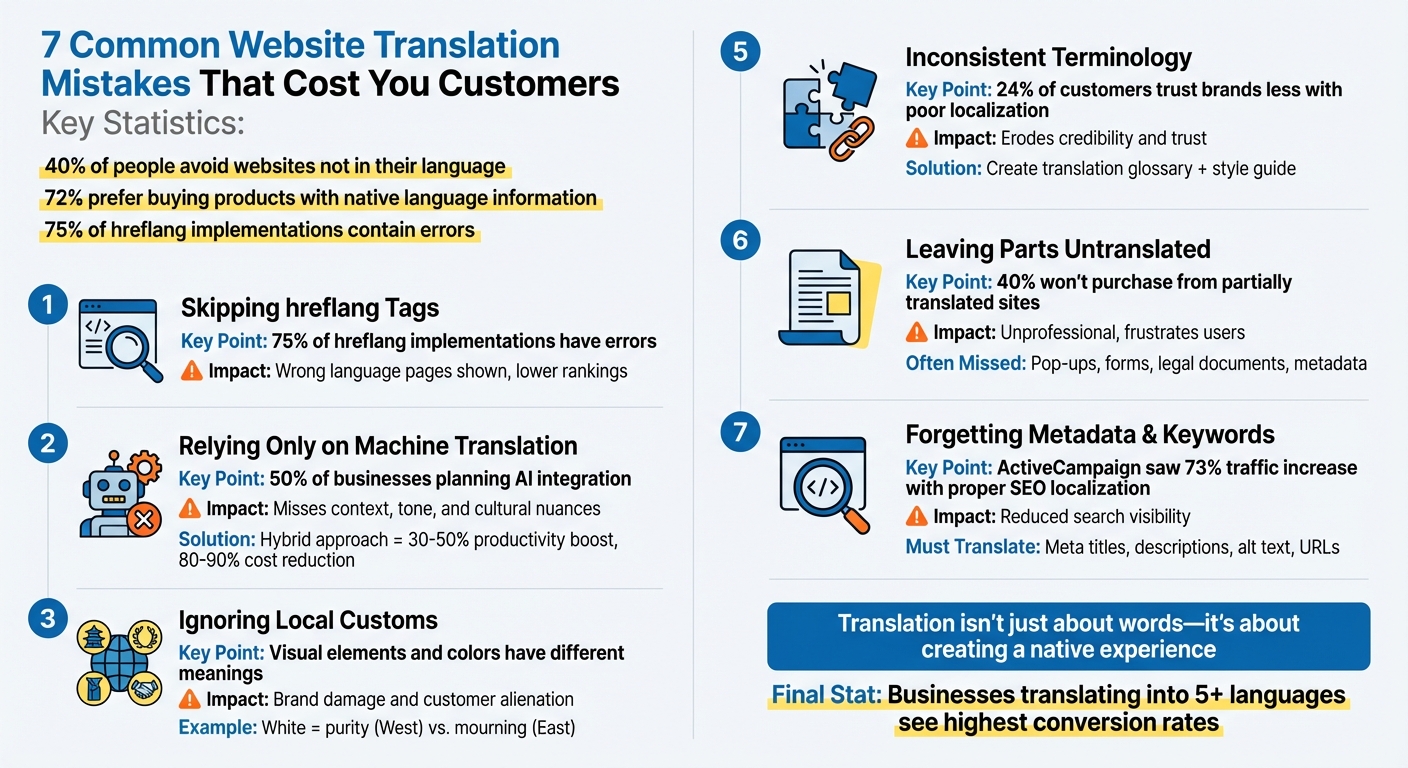
7 Common Website Translation Mistakes That Cost You Customers
5 mistakes to avoid when translating your web site to reach your international audience
sbb-itb-8482ffa
1. Skipping hreflang Tags and Multilingual SEO Setup
Hreflang tags are essential for guiding search engines to serve the correct language and regional content to users. For example, these tags ensure Spanish-speaking users in Mexico see Spanish content, while users in the US are shown English content. Without these tags, search engines might deliver the wrong page to users, leading to confusion and poor user experience.
Shockingly, about 75% of hreflang implementations contain errors, and many websites skip them entirely. When hreflang tags are missing or incorrect, Google might show an English page to French-speaking users or even flag regional variations - like US English versus UK English - as duplicate content. This can harm your search rankings and drive up bounce rates.
"Hreflang tags are one of the most confusing factors of international SEO. It is not as easy to implement as it is to make a mistake that can cost you brand visibility, targeting and ranking."
– Mari Skula, Chief of Content, Magefan
To get it right, ensure each page includes a self-referencing hreflang tag and reciprocal tags for all alternate language versions. For instance, if your English page links to your French page, the French page must link back to the English page to confirm their connection. Use ISO 639-1 language codes and ISO 3166-1 Alpha-2 country codes (e.g., "en-us" or "fr-ca"), and always separate them with dashes - not underscores.
Additionally, include an x-default tag for your global homepage or language selector page. This ensures users whose language preferences don’t match any specific version are directed to a default page. Finally, always use absolute URLs (like "https://example.com/es/") instead of relative paths to prevent indexing errors.
2. Relying Only on Machine Translation Without Human Editing
Manual vs automatic translation tools both have pros and cons, but relying solely on automation is far from perfect. Relying solely on these tools can lead to content that, while technically accurate, misses the mark in meaning, tone, or context.
Automated translations often stick to literal, word-for-word conversions, overlooking the subtleties of language and cultural context. This can result in embarrassing mistakes, especially with "false friends" - words that look the same in two languages but mean entirely different things. For instance, the English phrase "Break a leg" could be translated into French as "Cassez une jambe", which literally tells someone to break their leg. Similarly, "Think outside the box" might become "jump out of the frame to think" in Mandarin. These errors are particularly glaring when translating user interface elements or short texts, where every word counts.
Short texts, like button labels or navigation menus, are especially tricky for machine translation. Without enough context, the tools often make unreliable guesses, resulting in a robotic tone that feels unnatural to native speakers. This disconnect can alienate your audience and weaken your content’s impact.
The good news? You don’t have to abandon machine translation altogether. A hybrid approach - combining machine translation with human editing - is a smart solution. Nearly 50% of businesses are already planning to integrate AI into their translation processes. Why? Because this approach works. Hybrid workflows can boost productivity by 30-50% and cut translation costs by up to 80-90%. By pairing machine efficiency with human oversight, you can create translations that feel natural, capture context, and maintain your brand’s voice.
Don’t let poor translations drive potential customers away. A hybrid approach ensures your content resonates with your audience, while also protecting your site’s localization and SEO efforts.
3. Ignoring Local Customs and Context
Making your content resonate with a local audience goes beyond just translating words. Overlooking local customs and cultural nuances can quickly alienate your audience and damage your brand's reputation.
Cultural missteps can be costly. Take the U.S. Postal Service in 2001, for example - they had to pull brochures featuring a controversial flag that offended Vietnamese-American refugees. Another infamous mistake was Mercedes-Benz's initial entry into China. They branded themselves as "Bensi", which, unfortunately, translates to "Rush to Your Death" in Chinese. After realizing the blunder, they rebranded to "Ben Chi", meaning "Dashing Speed". These examples highlight how cultural oversights can have lasting consequences.
Visual elements carry cultural significance too. A gesture like the "thumbs-up", which is positive in the U.S., can be offensive in parts of the Middle East and West Africa. Similarly, the open hand emoji (🖐) is considered offensive in Pakistan. Even colors can send unintended messages - white, often associated with purity in Western cultures, represents mourning and death in certain Eastern cultures. On top of that, using imagery that doesn’t reflect the local demographic can make your brand feel out of touch.
Even practical details like date formats, measurements, and numbers can create confusion if not localized. In the U.S., dates are written as MM/DD/YYYY (e.g., 12/24/2025), while many other countries use DD/MM/YYYY (e.g., 24/12/2025). This difference can lead to misunderstandings about deadlines or event schedules. Similarly, Americans use imperial measurements like miles, pounds, and Fahrenheit, while most other countries rely on the metric system, using kilometers, kilograms, and Celsius.
To avoid these pitfalls, thorough cultural research is essential before translating your website or marketing materials. Collaborate with native speakers who not only know the language but also understand the local customs and context. Transcreation - adapting content to evoke the intended emotion rather than a direct translation - can make a big difference. A classic example is when KFC's slogan "Finger-lickin' good" was translated into Mandarin as "Eat your fingers off". Having a native reviewer involved can help catch these subtle but critical errors that automated tools often miss.
4. Using Word-for-Word Translation Instead of Adapting Meaning
Translating content word-for-word can lead to confusion - or worse, offense - when addressing international audiences. Literal translations often strip away the cultural and contextual layers that give meaning to language. What sounds professional in English may come across as awkward, robotic, or even nonsensical when translated directly.
"A word-for-word translation often fails to capture tone, context, and cultural nuance." - LinguaLinx
Real-world blunders highlight the risks of literal translation. Take Amazon Sweden's launch in October 2020, for example. Machine translation errors turned "chicken" into "kuk", a vulgar term in Swedish, drawing widespread ridicule on social media. Similarly, HSBC Bank had to spend $10 million in 2009 to rebrand after its slogan "Assume Nothing" was translated as "Do Nothing", which conveyed an entirely unintended message of laziness. Another case involved American Airlines, whose "Fly in Leather" campaign was translated into Spanish as "Vuela en cuero", a phrase that can mean "Fly naked" in many Spanish-speaking regions.
Literal translations also fall apart when dealing with idioms or context-specific meanings. Phrases like "get the ball rolling" or "cold feet" don’t have direct equivalents in many languages, and translating them word-for-word results in confusing gibberish. Similarly, words with multiple meanings - like "run" - lose their intended context when translated literally. Sentence structure poses another challenge: each language has its own grammatical rules, and ignoring these can render text difficult or even impossible to understand.
So, what's the fix? Transcreation. Instead of merely translating words, transcreation adapts the content to match the intent, tone, and emotional impact of the original message in the target language. This process requires working with native speakers who understand the cultural and linguistic nuances of the audience. To ensure consistency, create a glossary that defines how brand-specific terms should be handled across all materials. By focusing on transcreation, you can make sure your message feels natural and resonates with audiences across different cultures.
5. Using Different Terms and Brand Names Across Pages
Keeping your website's terminology consistent is just as important as addressing technical and cultural challenges. Imagine landing on a site where the "shopping cart" morphs into a "basket" and then a "bag" by the time you reach the checkout. This kind of inconsistency doesn’t just confuse - it erodes trust. In fact, 24% of potential customers say they’d trust a brand less if its website showed poor localization practices.
But the issue isn’t just about confusion. When your tone and product names vary, it can feel like encountering multiple brands on the same site. This undermines credibility. And here’s a key stat: 40% of consumers will only buy a product if the information is available in their language. If that information is inconsistent or contradictory, those customers are likely to move on.
"Inconsistencies in your brand's tone, values, and overall message can confuse customers, hurt your brand's credibility, and lead to a fragmented customer experience." - TransPerfect
How do you avoid this? Start by creating a translation glossary. This document should clearly define how key terms, product names, and technical phrases are translated across all languages. Pair it with a global style guide that outlines your brand's tone and voice. Use a translation management system with translation memory to ensure terms like "customer support" don’t suddenly switch to "client assistance" elsewhere on your site.
Regular reviews are also critical. As your website grows, new content can introduce terminology drift. Scheduling periodic audits helps you catch and correct these issues before they confuse your audience or harm your brand’s credibility. By sticking to structured translation practices, you’ll ensure your website remains clear, accurate, and relatable to international audiences.
6. Leaving Parts of Your Website Untranslated
A partially translated website can seriously harm your reputation on the global stage. Imagine a visitor landing on a page in their native language, only to encounter English pop-ups, untranslated forms, or a checkout process that suddenly switches back to the original language. It’s frustrating, unprofessional, and leaves customers questioning your commitment. In fact, studies reveal that 40% of customers won’t purchase from a website that isn’t in their language.
"Few things can be as damaging to your globalization effort than a 'mixed language' experience on a localized website, where content remains untranslated. It puts your brand's commitment to global markets in question - as well as your competence." – Reagan Evans, SVP of Sales, MotionPoint
This issue often goes beyond static pages. Interactive elements like pop-ups, web forms, cookie banners, and footers are frequently overlooked. Why? These components are often embedded in separate code files, making them easy to miss during the translation process. Even metadata - like SEO titles and image alt text - often remains in English, despite its importance in boosting visibility in local search results.
But that’s not all. The problem extends to critical back-end sections and legal documents. Many businesses focus on translating their marketing pages but neglect areas like member portals, help centers, post-login content, and essential legal texts such as privacy policies and terms of service. This oversight can lead to frustrated international users, higher churn rates, and even regulatory penalties like GDPR fines.
How can you prevent these translation gaps? Start by conducting a thorough audit of your entire website. Check everything - from internal links and language switchers (e.g., "Español") to member portals and legal documents. Set up a system where updates to your main site automatically trigger translations across all language versions. This ensures consistency and eliminates mismatched content that could erode trust and push customers away.
Covering every detail - visible content, interactive elements, and back-end sections - is essential for creating a smooth and trustworthy experience for your global audience. A fully translated website not only builds credibility but also strengthens your connection with users worldwide.
7. Forgetting to Translate Metadata, Keywords, and Technical Elements
Even the best-translated content can fall short if metadata, keywords, and technical elements are left untranslated. These behind-the-scenes components are crucial for driving traffic and shaping user experience, yet they’re often overlooked. When left in English, they not only reduce visibility on local search engines but also create a disjointed experience for users.
"Metadata - for example, SEO components and alternative text for images - is often an afterthought in the localization process. But optimized metadata is an important way to attract traffic organically through search engines." – Avantpage
Search engines depend on elements like meta titles, meta descriptions, and image alt text to understand and rank content. If these remain untranslated, your pages might not show up in local search results. For instance, Baidu, China’s leading search engine, places even greater emphasis on meta tags and optimized images than Google does. Beyond SEO, technical elements like error messages, form placeholders, and system notifications also play a key role in user experience. Imagine a checkout process where users see "Payment failed" in English instead of a localized equivalent - it can lead to confusion and erode trust. These technical oversights can undermine both search visibility and user confidence.
Keywords present their own set of challenges. Direct translations often miss the mark when it comes to how people actually search in different languages. For example, Italians commonly use "voli low cost" rather than the literal "voli a basso costo". Even within the same language, search terms can differ by region - what resonates in Spain might not work in Venezuela. A great example of the impact of proper localization is ActiveCampaign. After implementing SEO transcreation and localization for Spanish-speaking markets in 2024–2025, they saw a 73% increase in year-over-year traffic to their Spanish blog and a 111% boost in Help Center content usage.
To avoid these missteps, ensure your technical setup supports localization. Use UTF-8 encoding across all layers - HTML, server, and database - to prevent character corruption in non-Latin scripts. Externalize user-facing strings, such as button labels and error messages, into resource files like JSON or XML, making them easier to translate. Add hreflang tags and localize URLs (e.g., /es/, /fr/) to help search engines and users navigate your site effectively. Don’t overlook image alt text - translating it improves both accessibility and image search rankings.
Technical localization is the backbone of any successful translation effort. When metadata, keywords, and technical elements are aligned with your translated content, you create a seamless experience that earns user trust and delivers measurable results in global markets.
Conclusion
Translating your website is about more than just switching words - it's about creating a seamless, native experience for every audience. The seven mistakes highlighted earlier can harm your brand's reputation, hurt your search engine rankings, and ultimately cost you sales. Poor localization doesn’t just confuse - it erodes trust, which is essential for conversions. That’s why a thoughtful, strategic approach is key.
"Website localization is a holistic approach that aims to bridge language access, cultural competency, and user journey to ensure that users who speak different languages are able to access your content as if it were created specifically for their locale." – Avantpage
Avoiding these pitfalls doesn’t mean starting over. By using the technical foundations and cultural adaptation techniques discussed earlier, you can internationalize your website to handle diverse scripts, date formats, and varying text lengths. Develop a style guide and glossary to keep your messaging consistent across all languages. And while machine translation can help speed things up, human expertise is essential for capturing the subtle cultural details that algorithms often miss. Remember, localization isn’t a one-time task - it’s an ongoing commitment.
Here’s a telling statistic: 72% of global consumers prefer to buy products with information in their native language. Plus, businesses that translate their websites into more than five languages see the highest conversion rates. The takeaway? The potential for growth through effective localization is enormous.
FAQs
How can I use machine translation effectively without compromising quality?
To get the best results from machine translation while maintaining accuracy, think of it as a starting point, not the final product. Begin by using clear and straightforward source text - steer clear of idioms, overly complex sentences, or ambiguous phrases, as these can lead to mistakes in tone or meaning. Once the machine provides the initial translation, have a native-speaking editor review it to ensure the terminology is consistent, cultural subtleties are respected, and the language feels natural for a U.S. audience.
Enhance this process by using a well-organized glossary and style guide tailored to your brand. For example, specify preferences like writing "color" instead of "colour" or formatting prices as $99.99. Conduct quality checks to catch problems such as inconsistent terminology or incorrect placeholders. Finally, test the translation with native speakers to ensure it resonates and aligns with U.S. standards for dates, numbers, and measurements. By combining the speed of machine translation with human expertise, you’ll produce polished translations that truly connect with your audience.
What are hreflang tags, and why do they matter for multilingual websites?
Hreflang tags are HTML attributes that signal to search engines the language and regional focus of a webpage. For example, en-US indicates content tailored for English speakers in the United States. By connecting different language variations of your site, these tags help search engines display the right version to users based on their location and language preferences.
These tags are a must-have for multilingual websites. They not only help avoid duplicate content issues but also ensure users land on the version of your site that's most relevant to them. Without hreflang tags, search engines might serve the wrong language page, which can confuse visitors, increase bounce rates, and cause you to miss out on potential engagement. To function correctly, each language version needs to include return hreflang tags, confirming the relationship and improving both visibility and user experience.
How do cultural differences influence website translation and user experience?
Translating a website isn’t just about swapping words from one language to another. It’s about creating a localized experience that feels natural and relatable to the target audience. Overlooking cultural elements like local customs, humor, idioms, or even visual symbols can make your website come across as awkward - or worse, offensive. This disconnect can erode user trust and drive visitors away.
True localization goes beyond text. It involves adjusting tone, references, and even the design to match the audience’s expectations. For instance, incorporating local holidays, preferred measurement systems, or region-specific date formats can make a website feel more intuitive. Visual elements like colors, images, and layouts also carry different meanings across cultures, so these details must be handled with care to avoid missteps.
Machine translation alone often falls short when it comes to capturing subtleties like slang or regional dialects. That’s where native-speaking translators or transcreation experts shine. They ensure your website not only communicates effectively but also connects with users on a deeper level. The result? A smoother user experience, stronger engagement, and improved conversion rates.